
Descrição
Antimanual is the all-in-one AI plugin for WordPress — a single, modern dashboard that brings together a trainable AI chatbot, automated content publishing, bulk content rewriting, FAQ generator, documentation builder, repurpose studio, forum automation, AI-powered search, AI translation, SEO auditing, broken link monitoring, schema generation, content briefs, content freshness analysis, cannibalization detection, and intelligent internal linking.
Whether you run a SaaS product, an online store, a blog, or a community forum, Antimanual replaces multiple plugins with one tool and puts your most time-consuming site tasks on autopilot — no coding required.
Use your own API key — we don’t charge for it. Antimanual works with OpenAI, Google Gemini, Anthropic Claude, xAI Grok, DeepSeek, and OpenCode Zen, so you stay in full control of your AI usage and costs.
Antimanual Pro | Documentation | Support Forum
Supported AI Providers & Models
Antimanual currently supports these AI providers and built-in model options:
- OpenAI — GPT 5.4, GPT 5, GPT 5 Mini, GPT 4.1 Mini
- Google Gemini — Gemini 3.1 Pro Preview, Gemini 3.1 Flash-Lite Preview, Gemini 3 Pro Preview, Gemini 3 Flash Preview, Gemini 2.5 Pro, Gemini 2.5 Flash, Gemini 2.5 Flash Preview, Gemini 2.5 Flash-Lite, Gemini 2.5 Flash-Lite Preview
- Anthropic Claude — Claude Opus 4.7, Claude Sonnet 4.6, Claude Haiku 4.5
- xAI Grok — Grok 4, Grok 3, Grok 3 Mini
- DeepSeek — DeepSeek V4 Pro, DeepSeek V4 Flash
- OpenCode Zen — Big Pickle, MiniMax M2.5 Free, Qwen 3.6 Plus, Qwen 3.5 Plus, Kimi K2.6, Kimi K2.5, GLM 5.1, MiniMax M2.7
The plugin validates your API key, shows only supported models, and automatically disables features that are unavailable for the selected provider or model.
Video Overview
AI Chatbot — Instant 24/7 Support for Your Visitors
Train a custom chatbot on your own WordPress content. Instead of answering the same questions over and over, let the AI handle them — accurately, instantly, and around the clock. The chatbot uses vector embeddings from your knowledge base to give context-aware answers, not generic AI responses.
- Train on any WordPress post or page in one click
- Supports OpenAI, Google Gemini, Anthropic Claude, xAI Grok, DeepSeek, and OpenCode Zen with validated model selection
- Full appearance customization: colors, icon, position, welcome message, and suggested questions
- Fully mobile-optimized chat interface
- Conversation history tracked in the admin dashboard
- Custom fallback message for off-topic or irrelevant queries
- Chatbot leads capture and analytics
- Up to 60 conversations per month on the free plan
Auto-Posting — Publish Fresh Content Without Writing a Word
Schedule AI-generated blog posts to publish automatically. Pick your topics, tone, language, and posting schedule — Antimanual generates full Gutenberg posts and publishes them on time. Ideal for boosting SEO with consistent, fresh content.
- AI-powered topic suggestion tool to fill your content calendar
- Configurable tone, language, article length, and SEO settings
- Weekday/time scheduling with optional expiration dates
- Reliable queue system with automatic retry on failure
- Real-time status bar with manual trigger and pause options
- Up to 2 active schedules on the free plan
Generate Post with AI — One Prompt, One Publish-Ready Post
Create complete WordPress posts from a single prompt. Antimanual generates the title, full Gutenberg block content, URL slug, excerpt, categories, and tags — ready to publish or review.
- Smart prompt suggestions powered by your site context
- SEO options: focus keyword, meta description, table of contents, and internal link suggestions
- AI-generated featured image option
- Configurable author, status, categories, and tags
- Full history with search, filter, sort, and pagination
FAQ Generator — AI FAQs with Google Rich Snippet Schema
Generate structured FAQ content from your knowledge base with one click. Review and edit the Q&A pairs, then insert them as Gutenberg accordion blocks — complete with FAQ Schema markup for Google rich results.
- Generate from your entire knowledge base or specific sources
- Customizable tone and topic focus
- Interactive editable preview — add, edit, reorder, or delete any Q&A pair
- Output as default Gutenberg accordion or Advanced Accordion Block format
- FAQ Schema markup for SEO rich snippets in Google
Repurpose Studio — Turn One Post into Many Content Formats
Transform any existing WordPress post into social media content, email copy, video scripts, and more. Includes Quick Presets for Product Launch, Blog Summary, Event Promo, Tutorial Recap, Case Study, and Thought Leadership — making repurposing instant.
- Generate X/Twitter, LinkedIn, and Facebook posts from any article
- Create email newsletters and video scripts with hooks and CTAs
- Six built-in quick presets for the most common repurposing tasks
AI Documentation Generator — Professional Docs in Minutes
Build structured product documentation with AI. Define the number of lessons, sub-lessons, tone, and target audience — then let AI write each section. Designed for SaaS platforms, software products, and any project that needs organized, professional docs.
- 6-step guided wizard: Subject, Settings, Writing Style, Knowledge Sources, Generate, Review & Edit
- Content depth, target audience, table of contents, FAQ, and internal link options
- AI-generated featured image for the documentation
Bulk Rewrite — Refresh Dozens of Posts at Once
Select multiple posts and rewrite them with AI to improve readability, fix grammar, add structure, update outdated information, or optimize for new keywords. Antimanual preserves your existing Gutenberg block structure.
- 8 built-in Quick Presets: SEO Optimization, Content Refresh, Fix Grammar, Make Concise, Add Structure, Conversational Tone, Simplify & Improve, Complete Enhancement
- Custom rewrite prompts with saved templates and prompt variables
- Automatically regenerate SEO-friendly excerpts, tags, and taxonomy terms
- 100 rewrites per month on the free plan
Auto Update — Automatically Keep Old Content Relevant
Set up a schedule and let Antimanual automatically find and rewrite aging posts. Configure which post types to update, set a minimum age threshold, and the plugin handles everything else.
- Filter by post type, post status, and content age
- Update title, content, and excerpt independently
- Configurable tone, language, and advanced prompt settings
- Weekday/time scheduling with a stats dashboard
Forum Automation — AI-Powered Community Management
Integrate with Forumax to automate your WordPress community forums. AI generates answers to new topics and replies, and converts solved forum threads into permanent blog posts or knowledge base articles.
- AI auto-response for new forum topics and replies
- Configurable minimum word count and role exclusions
- Convert closed topics into WordPress posts with one click
- Up to 100 AI answers and 100 topic conversions per month on the free plan
AI Search Block — Intelligent Gutenberg Search Widget
Add a smart, intent-aware search experience to any page using the Antimanual AI Search Gutenberg block. It queries your knowledge base to understand what visitors are looking for and returns relevant answers — not just keyword matches.
- Dedicated analytics dashboard with query management and helpfulness voting
- Customizable block text, greeting title, popular keywords, and predefined questions
- Expanded styling controls for full visual customization
- Up to 100 lifetime search queries on the free plan
Smart Knowledge Base — The AI Brain of Your Site
The knowledge base is the engine that powers every AI feature in Antimanual. It stores vector embeddings of your content so the chatbot, search, generators, and translators can deliver accurate, context-aware results.
- Add any WordPress post or page with one click
- Automatic content chunking and embedding for optimal AI retrieval
- Knowledge Base auto-sync: automatically update embeddings when posts change (Pro)
- Advanced table view with bulk actions, filters, and pagination
Modern Admin Dashboard — Fast and Intuitive
Manage everything from a fast, React-based single-page application inside WordPress admin. Pages load instantly with no full-page reloads.
- AES-256-CBC encryption for all API keys — keys are never exposed to the frontend
- Validated model selection — only shows models available for your API key
- Advanced tables with search, sort, and pagination across all features
- Lazy-loaded admin pages for faster initial load
Pro Features — Unlock Unlimited Power
Upgrade to Antimanual Pro to remove all usage limits and unlock premium features unavailable in the free version.
- Unlimited usage across all features
- Supported multi-modal file processing for images, PDFs, audio, and video in eligible Pro workflows
- Expanded knowledge base: PDFs, external URLs, custom text, and GitHub repositories
- Knowledge Base Auto-Sync: embeddings update automatically when posts change
- AI Translation into 34 languages with bulk translation, glossary, and frontend language switcher
- Cross-domain chatbot embed via iframe
- Chatbot leads capture and analytics dashboard
- Generate Post batch mode — generate multiple posts from a topic list at once
Pro Max Plan — Built-In AI SEO Tools
Upgrade to Pro Max for the most complete AI-powered SEO toolkit in WordPress.
- SEO Agent — Score any page across On-Page SEO, Technical SEO, Performance, Accessibility, Security, and Mobile Friendliness. One-click auto-fix for title tags, meta descriptions, image alt text, lazy loading, and more.
- Bulk Site Audit — Audit up to 50 pages simultaneously. Export results as CSV.
- Competitor Comparison — Compare your page scores side-by-side with any competitor page.
- Broken Link Checker — Scan posts for 404 links, redirect chains, and mixed content with one-click fixes, scheduled scans, and a URL ignore list.
- Content Brief Generator — Build AI research briefs with recommended word count, headings, supporting keywords, FAQs, entities, and competitor insights.
- Content Freshness — Detect stale content and prioritize actions (keep, review, update, or rewrite) based on age, engagement, and update recency.
- Schema Generator — Detect existing structured data and generate validated JSON-LD for 11 schema types, including support for multiple schemas per post.
- Cannibalization Detector — Find competing pages targeting similar keywords and get canonical recommendations plus exportable action plans.
- Google Integrations — Connect Google APIs to unlock Core Web Vitals, Search Console, GA4 Organic Traffic, and Indexing API workflows from one dashboard.
- Internal Link Report — Full audit of all internal links, orphan pages, and link health score.
- AI Link Suggestions — Get content-aware internal link suggestions for any post.
- Bulk Auto-Link — Automatically insert internal links across multiple posts at once.
- Site Visualizer — Interactive visual map of your internal link structure.
Google Integrations — Bring Google SEO Data Into One Workflow
Connect your Google credentials once and run core SEO diagnostics and reporting from inside Antimanual.
- Core Web Vitals via PageSpeed Insights and real-user CrUX metrics (LCP, INP, CLS, and more)
- Search Console property insights with performance and URL inspection workflows
- GA4 Organic Traffic analysis to identify pages attracting search visitors
- Indexing API support for faster update and removal notifications
- Unified AI Prioritization by combining GA4, Search Console, and Core Web Vitals signals
- Credential Management with PageSpeed API key + Service Account setup and clear connection status badges
External Services
This plugin connects to the following external services.
OpenAI API
Powers AI chatbot, knowledge base embeddings, and all content generation features when OpenAI is the selected provider. Your WordPress post content (for KB indexing), visitor chat messages, and admin-configured prompts are sent to OpenAI via your own API key. Data is transmitted only when you trigger an AI action or a visitor interacts with the chatbot/search.
Google Gemini API
One of Antimanual’s supported AI providers. The same categories of data described for OpenAI above are sent to Google Gemini via your own API key, only when Gemini is the active provider.
Additional AI Providers
Depending on the provider you configure, Antimanual may also send your WordPress post content (for knowledge base indexing where supported), visitor chat messages, and admin-configured prompts to Anthropic Claude, xAI Grok, DeepSeek, or OpenCode Zen only when you trigger an AI action or a visitor interacts with the chatbot or AI search.
Spider Themes Notice Service
The plugin periodically fetches an admin notice from Spider Themes servers to display important announcements to site administrators. Only a standard HTTP GET request is made — no personal data, site content, or visitor information is ever transmitted.
Ecrãs
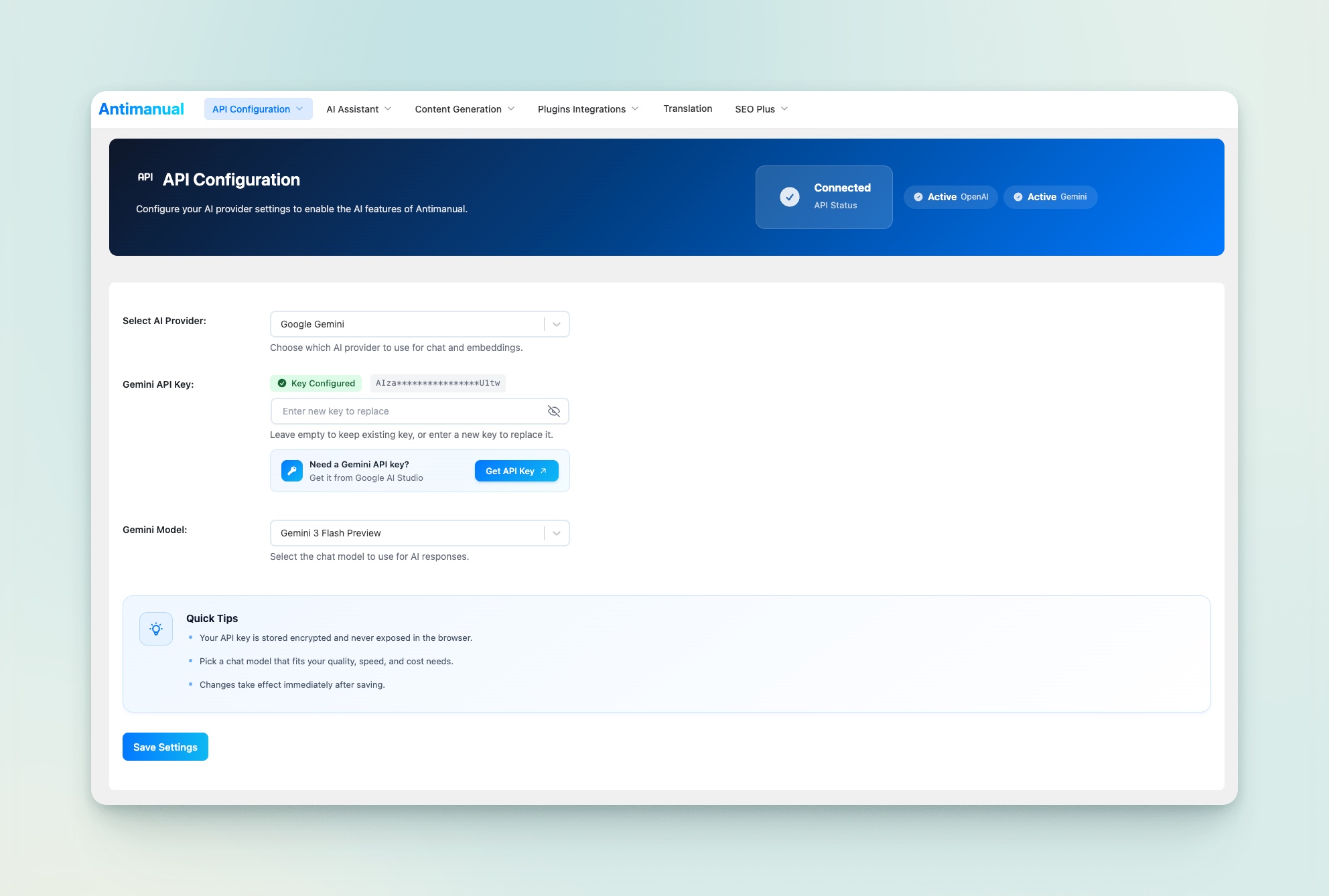
API Configuration – Configure AI API keys and global integration settings. 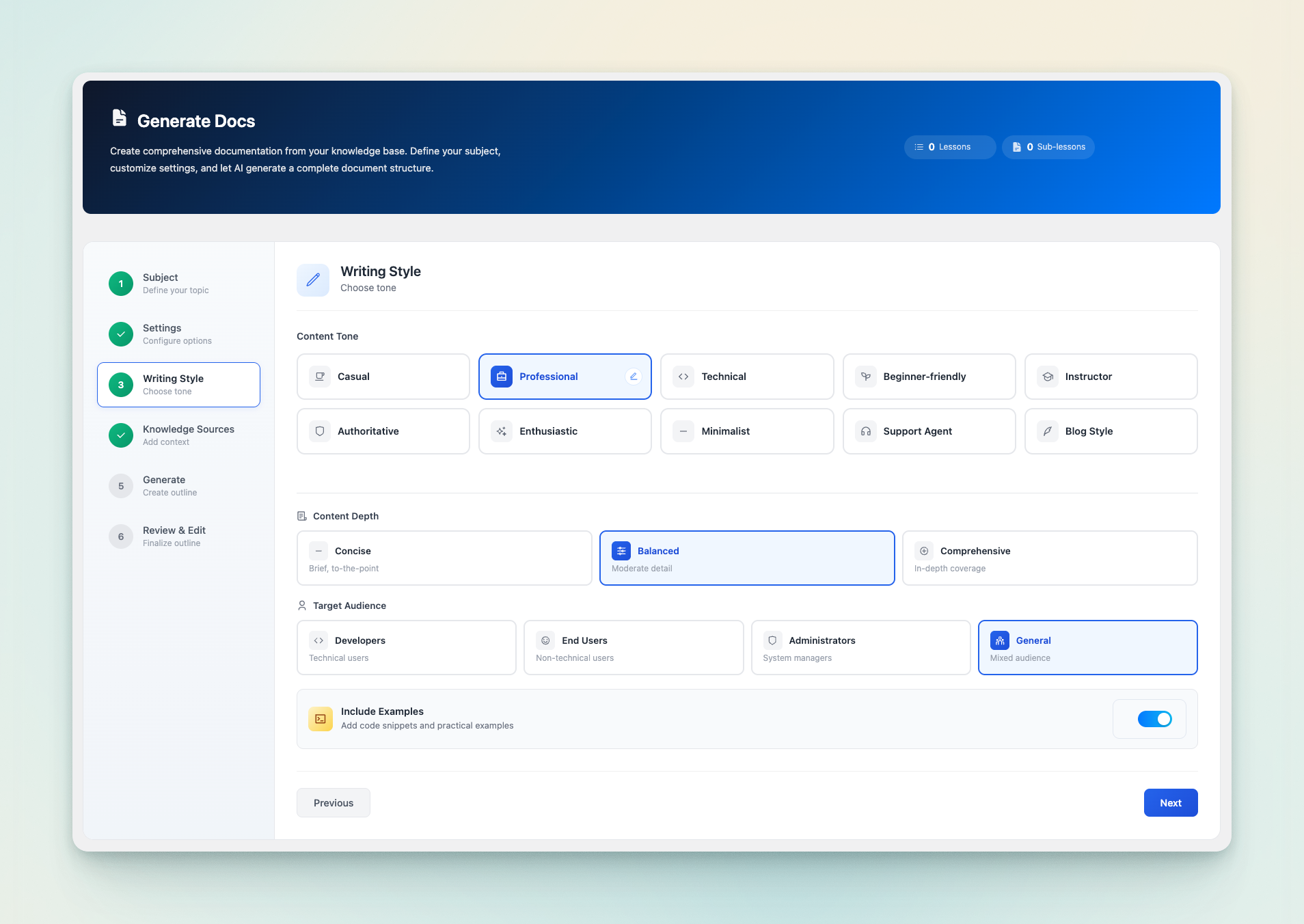
Generate Doc – Automatically generate structured documentation from custom prompts. 
Email Content Creator – Generate AI-powered emails with subject, preview, and optimized content. 
Template Designer – Design and preview beautiful email templates with custom styles. 
Pre-Send Review – Review campaign details, test emails, and launch with confidence. 
Subscriber Management – Manage contacts, organize lists, and track subscriber growth easily. 
Repurpose Studio – Instantly repurpose existing content into multiple optimized formats. 
Forum Automation – Automate forum replies and engagement using AI workflows. 
FAQ Generator – Generate relevant FAQs automatically from existing content. 
AI Search Block – Add intelligent AI-powered search block for documentation. 
Knowledge Base – Build and manage AI-powered documentation knowledge sources easily. 
Generate Post – Create high-quality SEO-optimized posts with AI assistance. 
Bulk Rewrite – Rewrite multiple posts simultaneously with consistent tone control.
Blocos
Este plugin inclui 1 bloco.
- Antimanual AI Search An AI-powered search block with intelligent results and references.
Instalação
- Upload the
antimanualfolder to/wp-content/plugins/, or install directly from the WordPress plugin repository. - Activate the plugin through the Plugins menu in WordPress.
- Navigate to Antimanual > Settings in your dashboard.
- Enter the API key for your preferred supported provider to power the AI features.
- Add content to your Knowledge Base and enable the Chatbot — you are ready to go.
Perguntas frequentes
-
What is Antimanual?
-
Antimanual is an all-in-one AI WordPress plugin that automates the most time-consuming parts of running a website. It includes a trainable AI chatbot, automated content publishing, bulk content rewriting, FAQ generator, documentation builder, repurpose studio, forum automation, AI-powered search, AI translation (Pro), SEO auditing tools (Pro Max), and an internal linking suite (Pro Max) — all managed from a single, fast admin dashboard.
-
Do I need an API key to use Antimanual?
-
Yes. Antimanual uses your own AI provider account/API key — we do not charge for API keys. You can connect OpenAI, Google Gemini, Anthropic Claude, xAI Grok, DeepSeek, or OpenCode Zen. Because you use your own key, you have full control over AI usage and costs — nothing is hidden or marked up.
-
Which AI models does Antimanual support?
-
Antimanual currently supports six AI providers and these built-in models: OpenAI — GPT 5.4, GPT 5, GPT 5 Mini, GPT 4.1 Mini; Google Gemini — Gemini 3.1 Pro Preview, Gemini 3.1 Flash-Lite Preview, Gemini 3 Pro Preview, Gemini 3 Flash Preview, Gemini 2.5 Pro, Gemini 2.5 Flash, Gemini 2.5 Flash Preview, Gemini 2.5 Flash-Lite, Gemini 2.5 Flash-Lite Preview; Anthropic Claude — Claude Opus 4.7, Claude Sonnet 4.6, Claude Haiku 4.5; xAI Grok — Grok 4, Grok 3, Grok 3 Mini; DeepSeek — DeepSeek V4 Pro, DeepSeek V4 Flash; OpenCode Zen — Big Pickle, MiniMax M2.5 Free, Qwen 3.6 Plus, Qwen 3.5 Plus, Kimi K2.6, Kimi K2.5, GLM 5.1, and MiniMax M2.7. The plugin validates your API key and only shows supported models available for your account.
-
Can I train the chatbot on my own website content?
-
Yes. The free version lets you add any WordPress post or page to the knowledge base with one click. The chatbot then uses AI vector embeddings of that content to give accurate, context-specific answers — not generic AI responses. Antimanual Pro extends the knowledge base to support PDFs, external website URLs, custom text, and GitHub repositories.
-
Is auto-posting fully automated?
-
Yes. Once you set up a schedule — choosing topics, tone, language, article length, and publishing time — Antimanual generates complete Gutenberg posts and publishes them automatically. The free plan supports up to 2 active schedules; Pro removes the cap entirely.
-
What are the usage limits on the free version?
-
The free plan includes: 60 AI chatbot conversations per month, 2 auto-posting schedules, 100 bulk rewrites per month, 100 forum AI answers per month, 100 forum topic conversions per month, and 100 lifetime AI search queries. Features with no usage limits on the free plan include: Generate Post with AI, Repurpose Studio, FAQ Generator, Docs Generator and Auto Update. Upgrading to Pro removes all usage caps.
-
What exactly is in the Pro Max plan?
-
Pro Max includes everything in the free and Pro plans, plus an expanded SEO toolkit. The SEO Agent runs AI-powered audits on any internal or external page, covers On-Page SEO, Technical SEO, Performance, Accessibility, Security, and Mobile Friendliness, and can auto-fix many common issues with a single click. It also includes advanced SEO workflows like Broken Link Checker, Content Brief Generator, Content Freshness scoring, Schema Generator, Cannibalization Detector, and Google Integrations (Core Web Vitals, Search Console, GA4, and Indexing API). The Internal Linking module provides a full link audit, AI link suggestions, bulk auto-linking, a visual site map, topic cluster builder, and anchor manager.
-
How does Internal Linking work?
-
The Internal Linking module (Pro Max) analyses all posts and pages on your site to build a complete link report — showing total posts, orphan pages, inbound/outbound link counts, average links per post, and a Link Health Score. You can then generate AI-powered internal link suggestions for any post, apply links in bulk, visualise your entire site’s link structure, and manage all anchor texts from one place.
-
What languages does AI Translation support?
-
Antimanual Pro includes AI translation for 34 languages. You can run bulk translations across all your posts, enable auto-translate on publish, add a custom glossary to protect brand terms, control tone and formality, and display a frontend language switcher that swaps content via AJAX — no page reload required. RTL languages are fully supported.
-
Can I embed the chatbot on another website or domain?
-
Yes. Cross-domain chatbot embedding via a simple iframe embed code is included with Antimanual Pro. This lets you deploy the same trained chatbot on multiple domains, documentation sites, or client properties — without any additional configuration.
-
Does Antimanual integrate with community forum plugins?
-
Yes. Antimanual integrates with Forumax for AI-powered automatic responses to forum topics and replies. It also lets you convert closed forum threads into WordPress posts or knowledge base articles with a single click.
-
Is my API key stored securely?
-
Yes. All API keys are encrypted at rest using AES-256-CBC encryption tied to your WordPress secret keys. Keys are never sent to the browser unmasked — the admin UI shows only a masked preview with a connection status indicator.
-
Can I use Antimanual with Google Gemini instead of OpenAI?
-
Yes. You can use Google Gemini instead of OpenAI, and you can also switch to Anthropic Claude, xAI Grok, DeepSeek, or OpenCode Zen from the API Configuration page. Antimanual validates the selected provider and model, then automatically disables unsupported options so your setup stays valid.
-
Does Antimanual add any SEO markup automatically?
-
The FAQ Generator adds structured FAQ Schema markup (JSON-LD) to FAQ blocks for Google rich results. The SEO Agent (Pro Max) can auto-add missing meta descriptions, fix image alt text, add Open Graph tags, and enforce proper canonical URLs — all editable before saving.
Avaliações


Contribuidores e programadores
“Antimanual – Automate manual tasks with 24/7 AI Agent” é software de código aberto. As seguintes pessoas contribuíram para este plugin:
Contribuidores


“Antimanual – Automate manual tasks with 24/7 AI Agent” foi traduzido para 1 locale. Obrigado aos tradutores pelas suas contribuições.
Traduza o “Antimanual – Automate manual tasks with 24/7 AI Agent” para o seu idioma.
Interessado no desenvolvimento?
Consulte o código, consulte o repositório SVN, ou subscreva o registo de alterações por RSS.
Registo de alterações
3.6.2 (23 May 2026)
- Updated: AI Provider Setup Guidance – Added a clear dashboard warning and one-click shortcut to connect an AI provider when no API key is configured.
- Updated: Admin Notice Delivery – Refreshed the remote notice service integration for more consistent admin announcements.
- Improved: Chatbot Interface – Refined message presentation, system message styling, and interaction flow for a cleaner chat experience.
- Improved: Chatbot Answer Relevance – Enhanced context-aware retrieval so replies stay better aligned with embedded knowledge.
- Optimized: Chatbot Response Pipeline – Streamlined frontend and backend processing to keep responses faster and more stable during active conversations.
- Fixed: Chatbot Context Handling – Resolved edge cases where context blending could reduce answer quality for some queries.
3.6.1 (21 May 2026)
- New: Conversation Inbox Controls – Added search, smart filters, sorting, pagination, and bulk actions so you can find, export, and manage conversations much faster.
- New: Broken Link Ignore Manager – You can now add URL or domain patterns directly to the ignore list and quickly clear or manage them from one place.
- Updated: Generate Post Design Step – Reorganized SEO and content feature controls into clearer grouped sections for a smoother content creation flow.
- Updated: Live Chat Composer – Reworked reply states with clearer locked-session messaging and a cleaner input experience for active chats.
- Updated: AI Model Capability Locks – Plugin features now automatically lock or unlock based on the selected AI provider and model, and unsupported options are disabled to prevent invalid configurations.
- Improved: Batch Post Generation – Added schedule preview, keyboard shortcut support, and live progress logs so long generation runs are easier to monitor.
- Improved: Visitor Context Panel – Live chat now surfaces richer visitor context, including readable session timing and location details when available.
- Improved: SEO Workflow – Refined embedded SEO controls and keyword research interactions for a more consistent setup experience inside Generate Post.
- Optimized: Chatbot Reply Speed – Accelerated AI reply performance with smarter knowledge retrieval and caching so visitors receive answers faster.
- Optimized: Knowledge Base Processing – Added background embedding migration and matrix cache rebuild workflows to improve speed and stability on large knowledge bases.
- Fixed: Block Validation – Resolved invalid block recovery prompts by normalizing generated list, heading, and accordion markup before saving.
- Fixed: Generate Post Reliability – Prevented malformed JSON responses caused by unexpected third-party output during generation requests.
- Fixed: Chatbot Escalation Card – Resolved reply finalization inconsistencies so escalation prompts display reliably after successful responses.
3.6.0 (19 May 2026)
- New: Multi-Provider AI Engine – Added support for Anthropic (Claude), xAI (Grok), and DeepSeek AI providers in addition to OpenAI and Gemini, complete with automatic fallback logic for embedding generations.
- New: OpenCode Zen Provider – Added support for the OpenCode Zen AI provider, unlocking 8 new curated models including DeepSeek, Qwen, and Kimi.
- New: Generate Post Shortcuts – Added convenient “Generate Post” call-to-action buttons directly on the post list and editor screens.
- New: Broken Link Checker Demo – Free users can now explore a fully interactive, read-only preview of the Broken Link Checker, powered by realistic sample data.
- New: Pro Max Teaser Pages – Redesigned the upgrade pages for SEO Agent and Internal Linking with clearer step-by-step workflows, feature highlights, and value stats.
- New: Live Chat File Attachments – Agents can now preview and send image attachments directly to visitors from the admin live chat panel.
- New: Visitor Context Panel – Live chat sessions now display the visitor’s current page URL, title, referrer, and browser information for better support context.
- New: Live Chat Audio Alerts – Added a toggleable notification sound when a visitor requests a live chat or sends a new message.
- New: Live Chat Archive – Added the ability to archive inactive chat sessions or permanently delete them with their transcripts.
- Updated: Article Outline – Redesigned the outline preview with clear heading tags, section-count indicators, and a modern card-based layout for better readability.
- Updated: Plan Rename – The “SEO Plus” plan has been renamed to “Pro Max” throughout the dashboard, navigation, error messages, and upgrade prompts for a clearer pricing structure.
- Updated: Chatbot Image Attachments – Visitor image uploads now require Live Chat Handoff to be enabled, ensuring images route only to a connected human agent. The setting has been moved into the Live Chat Handoff card.
- Improved: Chatbot Conversations – Conversation counts now display as a styled badge next to the tab name, and the count only appears when there are conversations.
- Improved: Chatbot Upgrade Prompts – Pro-locked tabs (Custom Answers, Leads) now show context-specific upgrade titles and descriptions instead of a single generic message.
- Improved: Chatbot Embed – The generated embed code now uses the configured header text color for the launcher icon so it stays readable on any color combination.
- Improved: Live Chat Attach Button – The image attach button stays visible when attachments are enabled and provides clearer guidance when handoff is not yet configured or available.
- Improved: EazyDocs Integration – The integration now respects the EazyDocs Assistant visibility setting and only activates with the EazyDocs Promax plan.
- Improved: Chatbot Header – Refined the chatbox header layout in the EazyDocs Assistant for a cleaner, more compact appearance, and hide the help text line when empty.
- Improved: Bulk Rewrite – Added an Action History tab so you can review past rewrites, image generations, and taxonomy assignments with one-click access back to the edited post.
- Improved: Admin Interface – Polished form controls, tooltips, range sliders, and alerts across the dashboard for a more consistent, accessible feel.
- Improved: Range Slider – The selected value now appears in a floating tooltip above the slider thumb that tracks your position as you drag, making the chosen value easier to read at a glance.
- Improved: Chatbot Lead Capture – The chatbot now intelligently skips the lead capture form if the visitor is already logged into WordPress.
- Improved: Plugin Uninstall – Added dedicated cleanup options to securely wipe stored Google API credentials and Core Web Vitals history upon uninstallation.
- Optimized: Generation Jobs – Switched from transients to a dedicated database table for tracking AI generation jobs, improving reliability and preventing state loss during long tasks.
- Fixed: Chatbot API Error – Removed the API error response when querying an empty knowledge base, returning a helpful system message instead.
- Fixed: Chatbot Conversations – The delete progress spinner now appears on the row being deleted instead of the currently selected conversation.
- Fixed: Gemini Chatbot – Resolved an issue where plain-text inputs could fail to generate replies in some chat configurations.
3.5.0 (21 April 2026)
- New: Background Tasks – A new notification bell in the navbar to track the progress of AI generation and background tasks.
- New: Conversation Memory – The chatbot now remembers previous messages in the conversation, allowing for natural follow-up questions.
- New: Featured Image Generation – Added the ability to automatically generate featured images in bulk using the Bulk Rewrite feature.
- Updated: Features – The Email Campaigns module has been removed to streamline the plugin and focus on core AI features.
- Improved: AI Generation Queue – Refined the background generation process using WP-Cron for more reliable and resilient post creation.
- Improved: Post Generation – Enhanced support for taxonomy and SEO settings when generating posts and auto-posting.
- Improved: Humanize Content – Improved the prompt instructions to produce even more natural, human-like text that bypasses AI detection.
- Improved: Bulk Rewrite – Replaced the “Make Concise” preset with “Humanize” to help rewrite existing content in a more natural, conversational tone.
- Improved: Content Limits – Adjusted content length constraints so generated articles aren’t discarded if they slightly miss the requested word count.
3.4.1 (19 April 2026)
- New: Keyword Research – AI-powered keyword generation replaces manual tags in SEO settings.
- New: Keyword Metrics – Added search volume, ranking difficulty, and search intent metrics to assist in content planning.
- New: Prompt Suggestions – Discover relevant keywords instantly with a single click across Generate Post, Auto Posting, and Knowledge Base features.
- New: Humanize Content – A new anti-AI detection toggle that automatically applies human-like conversational styles and sentence structures to generated articles.
- Updated: Writing Tones – Removed the “Authoritative” tone to streamline options, with existing defaults automatically swapped to “Professional”.
- Improved: Auto Posting Layout – Redesigned the configuration form into a streamlined, step-by-step wizard matching the Generate Post interface, complete with a final configuration summary.
- Improved: Auto Posting Defaults – The “Humanize Content” tone is now automatically selected by default to ensure scheduled posts bypass AI detection out of the box.
- Improved: Humanize Content – Enhanced the underlying AI instructions with a comprehensive anti-AI detection guide to produce even more natural, human-like text.
- Improved: Campaign Reports – The reports dashboard now displays detailed metrics for replies, forwards, and spam reports.
- Optimized: Admin Architecture – Consolidated table styles for faster loading and better consistency across the dashboard.
3.4.0 (31 March 2026)
- New: Campaign Reports – Detailed campaign analytics with summary stats, delivery rates, open and click metrics, and campaign-to-campaign comparison in a single dashboard.
- New: Opens by Location – Interactive, responsive chart and country table showing where subscribers open your emails, with percentage breakdowns.
- New: Opens by Time – Hourly area chart visualizing when subscribers are most active opening your emails throughout the day.
- New: Click Activities – Tracked link extraction from email content with a visual link click map overlay and per-link tracking indicators.
- New: Delivery Log – Paginated recipient activity log with status-based filtering (delivered, opened, clicked, failed, unsubscribed, and more).
- New: Apple MPP Detection – Distinguishes reliable opens from Apple Mail Privacy Protection pre-fetches, giving you more accurate open rate insights.
- New: User Agent Analytics – Breakdown of email client and device usage across your campaign recipients.
- New: Email Preview – Live preview of your campaign email content directly within the report view.
- Updated: Chatbot UI – Completely modernized the chat interface with a premium, minimalist design, circular launcher, auto-expanding text area, and pill-shaped suggestion buttons.
- Updated: Email Subscribers – Enhanced all bulk actions with real-time per-contact progress indicators and the ability to safely stop actions mid-run.
- Improved: Chatbot – Refined the mobile layout for better responsiveness, ensuring a consistent and engaging user experience across all smaller screens.
- Improved: Email Settings – Added support for {{first_name}} and {{last_name}} dynamic variables to the email template preview.
- Improved: Subscribers – Made the lists sidebar sticky so it remains visible when scrolling down long subscriber lists.
- Improved: Campaign Reports – Report filters and active tabs are now preserved in the URL, so refreshing the page or sharing the link retains your current view.
- Improved: Campaign Reports – Date range filtering now validates input dates and auto-corrects reversed ranges for reliable results.
- Fixed: Campaign Reports – Resolved an issue with the “Share Report” button to ensure campaign reports can be correctly shared via generated tokens.
- Fixed: Live Chat – Image attachments shared by visitors now display correctly in the admin live chat panel.
3.3.0 (26 March 2026)
- New: Doc Generation – Added the ability to generate or regenerate individual documentation sections independently.
- New: Doc Generation – AI can now automatically generate and assign excerpts and categories or tags to documentation pages.
- New: System Info – A new diagnostics tab in Configuration shows your server health, environment details, and requirement checks at a glance.
- New: Uninstall Cleanup – Each module now has a cleanup toggle so you can choose whether to keep or delete its data when the plugin is uninstalled.
- Updated: Post Generation – Reorganized the Knowledge Sources and Scheduling settings for a clearer creation flow.
- Improved: AI Search – Source links now use smarter matching, so only genuinely related articles appear as references.
- Improved: AI Search – Queries in languages with different alphabets (like Arabic, Chinese, Japanese, Korean, and Cyrillic) are now counted and handled accurately, improving answer quality for multilingual sites.
- Improved: Alert Component – Enhanced with action buttons, screen reader support, and more flexible styling options.
- Improved: Admin UI – Updated and matched the design of statistics and empty screens across all features for a more consistent look and feel.
- Improved: Admin UI – Cleaned up the design of the API key setup box.
- Improved: Chatbot Settings – Updated the settings layout for an easier and cleaner experience.
- Improved: Knowledge Base Context – Upgraded the AI behind the scenes so it gives smarter, faster, and more consistent answers across all features.
- Improved: Post Generation – Expanded the tone selector layout for better visibility.
- Improved: Admin UI – Added category icons to the main navigation menu for quicker finding.
- Optimized: Connection Stability – The plugin will now automatically retry connecting if your server gets temporarily busy, reducing errors.
- Optimized: Knowledge Base – Managing many posts at once is now handled one by one to prevent server overload.
- Fixed: Chatbot – Disabling the Chatbot module from the Modules tab now correctly removes the chatbot widget from the frontend.
- Fixed: Connection – Fixed an issue that could cause connection problems on certain website setups.
3.2.1 (19 March 2026)
- Updated: Admin Menu – the plugin menu is now positioned lower in the WordPress admin sidebar, below the core content menus, following WordPress plugin guidelines.
- Fixed: AI Search Block – the feedback voting feature no longer relies on a hardcoded AJAX path and will now display a clear message if the endpoint is unavailable in non-standard server configurations.
- Fixed: Chatbot – the welcome message now correctly renders formatted text including bold and links, instead of displaying raw HTML.
- Fixed: Security – Strengthened output escaping across the chatbot shortcode to ensure all dynamic values are safely rendered in their correct HTML context.
- Fixed: Security – Tightened input handling across all AJAX endpoints and API request handlers to ensure every field is properly unslashed and sanitized before use.
- Fixed: Security – Added direct-access protection to additional plugin files to prevent them from being loaded outside of WordPress.