

Descrição
Finally, WordPress analytics you’ll actually use
Google Analytics is overkill. Most other WordPress statistics plugins are cluttered and confusing. You just want to track visitors and know what’s happening on your site, without a data science degree.
Burst Statistics gives you a clean, intuitive analytics dashboard focused on the metrics that actually matter. No external analytics accounts. No complex setup. Install, activate, and understand your website traffic in seconds.
Trusted by 200,000+ WordPress sites. Built by the team behind Team Updraft, known for UpdraftPlus, WP-Optimize, and All-In-One Security (AIOS).
O que nossos usuários estão dizendo
“Finally, an analytics plugin I can actually explain to clients.”
— @anguskeystone on wordpress.org“I tried WP Statistics and Independent Analytics, but they’re overloaded and confusing. Burst’s UI is intuitive and focused on what matters to me.”
— @vallered on wordpress.org
Por que escolher o Burst Statistics?
Analytics designed to be actionable
Other analytics plugins throw everything at you. Burst shows what matters, visitors, pageviews, referrers, top pages, in a dashboard you’ll actually use. No data overload. No confusing menus. See why Burst is perfect for bloggers.
Privacy analytics by design
All site stats stay on your server, making Burst a true local analytics solution. No external tracking. Your data is yours, we never see it without your explicit permission. Designed for GDPR compliant analytics out of the box. Read why Burst Statistics is privacy-friendly.
Zero setup friction
Install, activate, done. No Google Analytics account, no GA4 setup, no tracking codes, no configuration headaches. Start seeing live visitors immediately. New to analytics? Start with our guide on WordPress analytics.
WordPress-native analytics
Not a port from another platform. Built specifically for WordPress with native performance and seamless integration. Works with WooCommerce, blogs, business sites and membership sites.
Lightweight analytics, fast by default
Optimized database queries. A tiny tracking script under 4 KB. No external dependencies slowing down your pages. Designed to track accurately even when using aggressive server-side caching. See the proof in does Burst slow down my website.
Recursos
Understand your website traffic
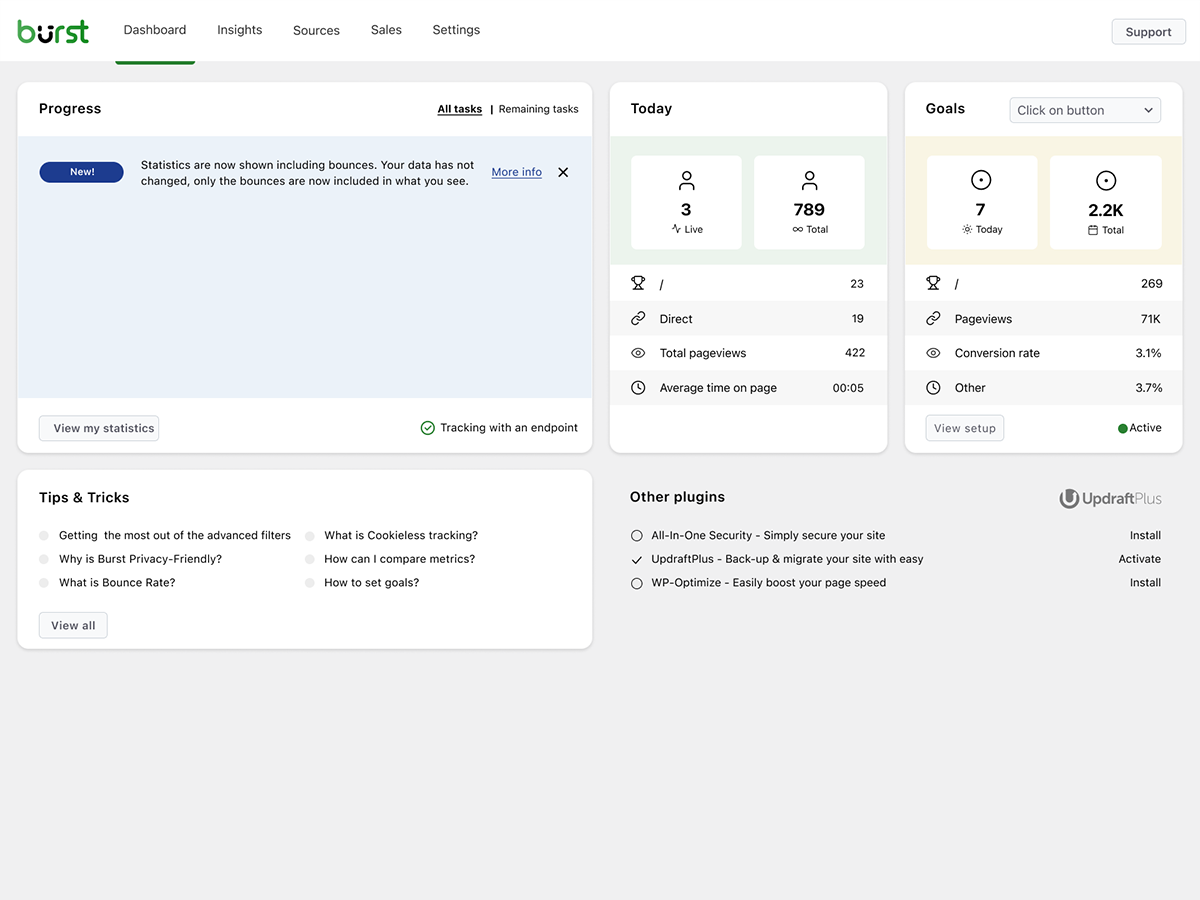
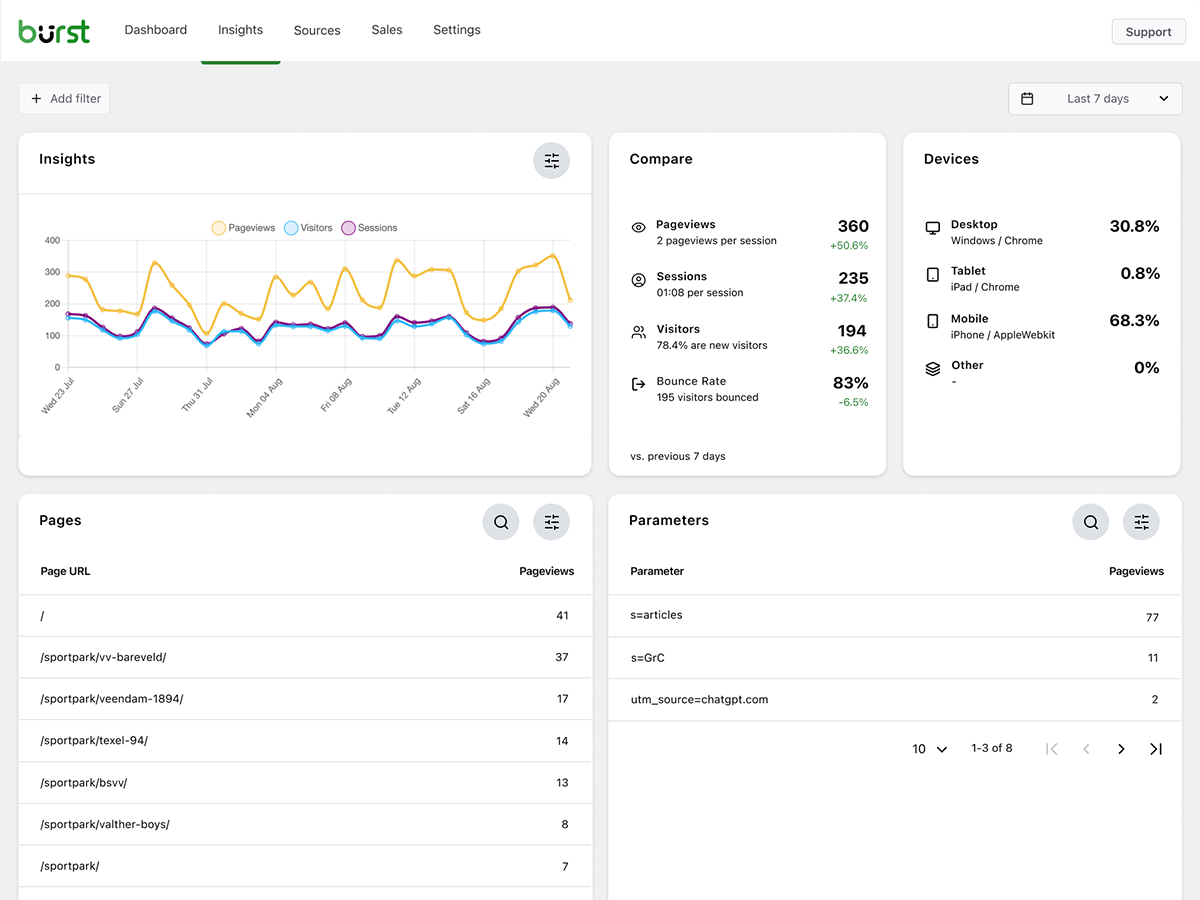
- Top performing pages and posts at a glance
- Track key metrics: visitors, sessions, pageviews, bounce rate
- Breakdown of visitors by device (desktop, tablet, mobile)
- Filtrar dados por intervalos de datas personalizados
- Compare traffic between periods
Análises em tempo real
- Identifique a origem em tempo real para visitantes ao vivo
- See the specific pages users are visiting now
- Live count of active users on your site
Veja qual conteúdo está bombando
- Principais páginas e posts classificados por visualizações
- Compare qualquer intervalo de datas
- Acompanhe o desempenho de cada página
Custom conversion and goal tracking
- Track views, clicks and WordPress hooks
- Track WooCommerce analytics & sales (Burst Pro Business)
- Track custom events and conversions
- Step-by-step setup in our goals guide
Privacy-friendly analytics without compromise
- 100% self-hosted, all statistics stored locally in your WordPress database
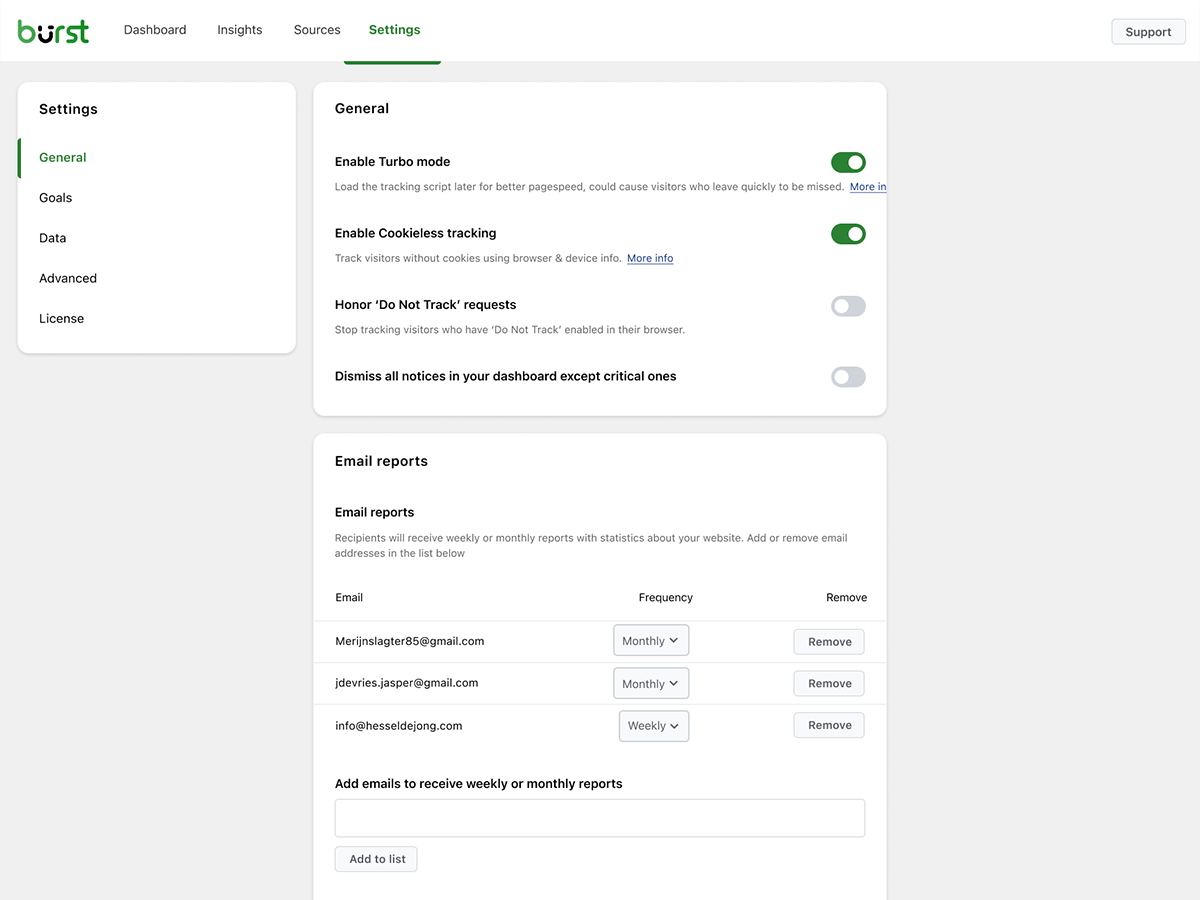
- Cookieless tracking option, a cookie free analytics setup with no consent banner required in many countries
- Analytics designed to support GDPR, CCPA, DSGVO, AVG, RGPD and PECR compliance
- No data shared with Google, Facebook or any third party
Fique por dentro
- Relatórios por e-mail semanais ou mensais entregues na sua caixa de entrada
- Compare períodos para identificar tendências
- Receba uma notificação quando o rastreamento não funcionar
A WordPress-native Google Analytics alternative
If you’ve outgrown Google Analytics, or never wanted GA4 in the first place, Burst is built for you. As a Google Analytics alternative, Burst trades GA4’s complexity for clarity. You get the metrics that matter on a single dashboard, without sampling, without data thresholding, and without sending your visitors through Google’s ad network.
GA4 is built to make Google’s ad business better. Burst is built to make your website better.
Curious about the full picture? Read why WordPress site owners are leaving Google Analytics behind or the head-to-head Burst Statistics vs Google Analytics.
From the team behind UpdraftPlus, WP-Optimize and All-In-One Security
Burst Statistics is part of Team Updraft, the team behind some of the most installed WordPress plugins on the market:
- UpdraftPlus – WP backup and migration plugin
- WP-Optimize – cache, image compression, minification and database cleanup
- All-In-One Security (AIOS) – security and firewall
Who is Burst Statistics for?
Burst works for any WordPress site, but we’ve built specific solutions for the four audiences who get the most out of it:
- Bloggers and content creators, see which posts resonate with your audience
- Entrepreneurs and small business owners, understand your traffic and campaigns without complexity
- WooCommerce stores, track visitor behavior, revenue and product performance
- Agencies and freelancers, manage analytics and reporting for multiple client sites
- Privacy-conscious site owners, GDPR compliant analytics without consent banners
- Anyone tired of Google Analytics, get clarity instead of confusion
Grátis vs Pro
Burst Statistics (free) includes everything you need to understand your website traffic. Visitors, pageviews, referrers, top content, device stats, goal tracking, email reports and more.
Burst Pro adds advanced features for businesses and professionals. Compare all plans on the pricing page.
CREATOR PLAN
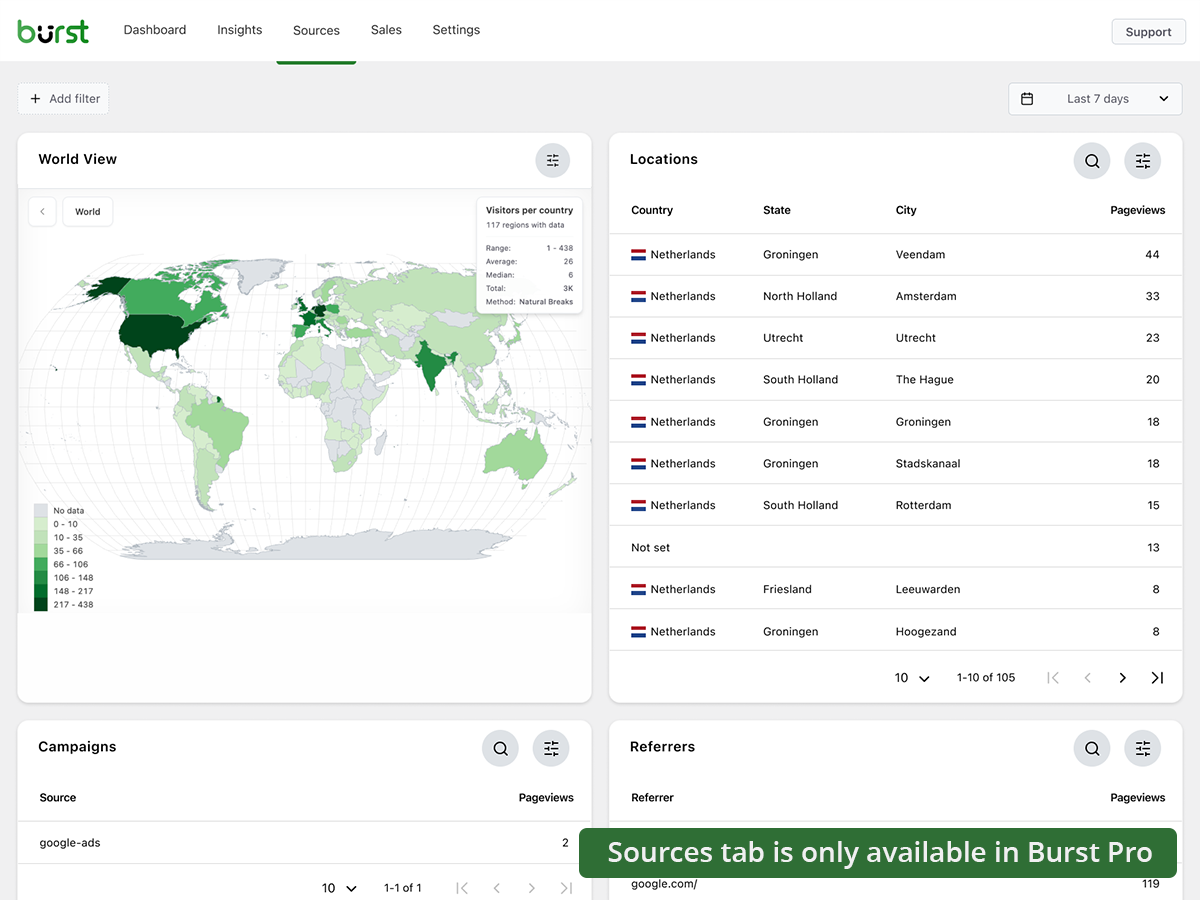
- UTM campaign tracking, see which marketing efforts drive results
- Geographic data, country and city-level visitor insights
- Advanced filtering, segment data by any dimension
- Data archiving settings, keep your database lean automatically
- Priority support, direct contact with our developers
BUSINESS PLAN
- Everything in the Creator plan, plus
- Full WooCommerce sales dashboard, see which content brings in the most revenue
- Revenue attribution, connect WooCommerce sales to traffic sources
AGENCY PLAN
- Everything in the Business plan, plus
- Reporting, generate shareable performance reports for clients
All Burst Pro plans include priority support. You’ll have direct contact with our developers, real humans, not a chatbot.
How Burst compares to other WordPress analytics plugins
We’re often asked how Burst stacks up against other tools. Honest, short version:
- Google Analytics / GA4, GA4 is powerful but built for advertisers, not site owners. It’s complex, applies sampling and thresholding to your numbers, and requires a cookie banner in most countries. Burst is a simpler, privacy-friendly GA4 alternative that shows real numbers without the setup. Read the full comparison.
- MonsterInsights, MonsterInsights is a connector that pipes your data into Google Analytics. If you want a true MonsterInsights alternative that keeps data on your own site instead of sending it to Google, Burst is a better fit.
- Independent Analytics, a respectful competitor with a similar privacy-first, WordPress-native approach. Burst leans harder into actionable dashboards, deeper UTM and goal tracking, WooCommerce revenue analytics and Agency-tier reporting. Try both and pick the one that clicks.
- Koko Analytics, a clean, lightweight option that focuses on the basics. Burst goes further with goal tracking, real-time analytics, UTM campaigns, WooCommerce analytics and email reports.
- WP Statistics, a long-standing WordPress stats plugin with a lot of options. Many users find the interface cluttered. Burst focuses on a single, clear dashboard designed for clarity over feature count.
- Matomo, self-hostable and feature-rich, but heavier and more complex to run. Burst is the simpler, faster, fully WordPress-native option.
Useful guides and resources
Learn the metrics, fix common problems, get more out of your analytics. All free, all on burst-statistics.com.
Getting started
- WordPress analytics and the metrics that actually matter
- How to install Burst Statistics from the WordPress Repository
- How to set up your first goal
Privacy and GDPR
- Why Burst Statistics is privacy-friendly
- How to configure your website without a cookie banner
- How Burst tracks website visitors without cookies
Metrics and data interpretation
- How to reduce bounce rate in WordPress
- What is bounce rate?
- What is a pageview?
- What is conversion rate?
Campaigns and conversions
- How to track UTM (and Burst) parameters
- Campaign URL builder
- How to create and A/B test marketing campaigns with Burst
WooCommerce
- 10 proven ways to reduce WooCommerce cart abandonment
- Introducing sales analytics for WooCommerce in Burst Pro
Browse the full Learn hub for more.
Instalação
- Go to Plugins → Add New in your WordPress dashboard
- Procure por Burst
- Clique em Instalar Agora, depois em Ativar
- Visit Statistics → Dashboard to see your analytics
That’s it. No external accounts. No tracking codes to paste. Burst starts collecting site stats immediately.
Prefer installing manually or via Composer? See installing Burst Statistics with Composer.
Ecrãs
Blocos
Este plugin inclui 1 bloco.
- Pageviews Counter
Perguntas frequentes
Is Burst Statistics really free?
Yes. Burst Statistics is 100% free with no tracking limits. Burst Pro is optional for users who need advanced features like UTM tracking, revenue attribution, geographic data or client reporting. That’s how we keep Burst Statistics free for most users.
Onde os dados são armazenados?
All statistics are stored in your own WordPress database. Unlike Google Analytics or cloud-based tools, we have zero access to your data. Your data never leaves your server, unless you manually opt in to share anonymous usage insights with us. Read more about how Burst handles your data.
O Burst é uma boa alternativa ao Google Analytics?
Yes. If you find GA4 too complex, or you’re concerned about sending visitor data to Google, Burst is a clean replacement. You get the website traffic stats you actually need, visitors, referrers, top pages, conversions, without the overwhelm. Read our Google Analytics alternative guide for the full comparison.
Is Burst a good GA4 alternative?
Yes. Burst was built as a privacy-friendly GA4 alternative for site owners who want clarity instead of complexity. No Google account, no tag manager, no cookie banner in most cases. See why WordPress site owners are leaving Google Analytics behind.
Is Burst a MonsterInsights alternative?
Yes. MonsterInsights connects your WordPress site to Google Analytics, so your data still flows to Google. Burst keeps everything on your own server, with its own dashboard inside WordPress. If you want analytics that don’t depend on Google, Burst is the simpler MonsterInsights alternative.
How is Burst different from WP Statistics, Independent Analytics or Koko Analytics?
Burst focuses on clarity over quantity. While some other WordPress analytics plugins can feel cluttered, Burst’s dashboard is designed to show you what matters without the noise. Independent Analytics is closest in spirit, with a shared privacy-first, WordPress-native approach. Burst differentiates with deeper UTM tracking, WooCommerce analytics and Agency-tier reporting. WP Statistics offers a wider feature set, but many users find it overwhelming. Koko Analytics is intentionally minimal, so it works well for very basic needs.
How is Burst different from Matomo?
Matomo tries to be a full Google Analytics replacement. Burst tries to be the clearest, most actionable WordPress analytics tool. If you want simplicity, fast setup and a native WordPress experience, Burst is the better fit. If you need granular configuration and a full GA-style feature set, Matomo may suit you better.
Eu preciso de uma conta?
No, you don’t need an account, no data is sent to another website.
Existe um limite para o número de visitantes que posso rastrear?
No. The only limiting factor is your own database and server.
There is an option to use cookieless tracking if you prefer. By default, Burst uses cookies because they’re more accurate and lightweight. Even with cookies, Burst remains privacy-friendly because all data is anonymous and stored on your server. Read more about why cookies are misunderstood.
Burst Statistics can be used without setting cookies or storing data in browsers. This can affect accuracy slightly, so a hybrid option with cookies after consent is also possible. See how Burst tracks visitors without cookies.
Is Burst GDPR compliant?
Burst is designed to support GDPR, CCPA, DSGVO, AVG, RGPD and PECR compliance. Data stays on your server, tracking is anonymous, and you can disable cookies entirely. For most setups, no consent banner is needed for analytics. See how to configure your website without a cookie banner.
Posso usar o Burst junto com o Google Analytics?
Yes. Many users run both during a transition period, or keep GA4 for historical data while using Burst for daily insights. There’s no conflict.
Does Burst Statistics slow down my website?
No. Burst is built for performance with optimized database queries, a minimal tracking script and a Turbo Mode if speed matters more than perfect accuracy. The full breakdown is in does Burst Statistics slow down my website.
O Burst funciona com o WooCommerce?
Yes. Basic pageview tracking works in the free version. For full WooCommerce analytics, revenue tracking, product performance and sales attribution, you’ll need Burst Pro Business.
Como faço para migrar de outro plugin de análise?
Install and activate Burst, it starts tracking immediately. Historical data from other plugins can’t be imported, but you can run both side-by-side during a transition period.
É possível instalar o Burst Statistics com o Composer?
Yes. Both the free and premium plugins can be managed with Composer. Read the Composer installation guide for more information.
Posso dar feedback sobre o plugin?
Valorizamos seu feedback. Você pode enviar uma solicitação de suporte nos fóruns do WordPress, e responderemos prontamente.
Avaliações


Contribuidores e programadores
“Burst Statistics – Simple WordPress Analytics (Google Analytics Alternative)” é software de código aberto. As seguintes pessoas contribuíram para este plugin:
Contribuidores


“Burst Statistics – Simple WordPress Analytics (Google Analytics Alternative)” foi traduzido para 56 locales. Obrigado aos tradutores pelas suas contribuições.
Interessado no desenvolvimento?
Consulte o código, consulte o repositório SVN, ou subscreva o registo de alterações por RSS.
Registo de alterações
3.5.0
- June 3rd 2026
- Improvement: AI chat availability checks and ability registration, preventing PHP notices and duplicate ability registrations.
- Fix: AI Chat integration with AI plugin.
- Fix: missing GROUP BY in a statistics query.
3.4.3
- May 20th 2026
- Fix: AI chat enablement and MainWP integration reminder tasks can now be dismissed permanently.
- Fix: AI chat assistant is now hidden for users without the manage_burst_statistics capability.
- Fix: modal position calculation in the shared viewer.
- Fix: scope application password auth probing to Burst REST endpoints, so authentication on unrelated REST routes (e.g. WooCommerce) is no longer affected.
- Security: harden rest api optimizer, Props Sanjay Singh Jhala.
- Improvement: performance of background aggregated table build, time out guards on sql queries, additional indexes on the burst_statistics table.
- Improvement: AI chat enablement task now links to the “Ask Burst anything” setup guide.
3.4.2
- May 12th 2026
- New: AI chat integration via the WordPress Abilities API, including granular datatable abilities with metric allow-listing for pages, parameters, referrers, countries, campaigns, sales and subscription products.
- New: granular datatable REST endpoints (data/datatable/{id} and data/ecommerce/datatable/{id}) so the dashboard and AI abilities can request a specific table by id.
- Improvement: refactor the Share class into dedicated Share_Tokens, Share_Routing, Share_Auth and Share_UI services for clearer responsibilities and easier maintenance.
- Improvement: dark mode initialization respects an explicit “light” preference so users on a dark OS no longer briefly see a dark skeleton when they have forced light mode.
- Improvement: upgrade routine corrects the stored activation time for sites with older data.
- Improvement: replace native checkboxes with Radix checkboxes in the Share dialog for consistent styling.
- Improvement: shared-link capability checks now reflect the currently requested dashboard tab instead of a single cached value, so per-tab permissions are enforced correctly during batch REST requests.
- Fix: dashboard route returns a 404 when the user is not allowed to load it, instead of rendering an empty page.
- Security: limit Share link viewer statistics access, props Sanjay Singh Jhala.
- Security: REST API optimizer now matches the Burst namespace strictly against the URL path (anchored at burst/v1), props Sanjay Singh Jhala.
- Security: harden MainWP proxy authentication. Props Sanjay Singh Jhala, Chloe Chamberland & PRISM – Wordfence
- Security: Auto Installer now requires the install_plugins capability instead of activate_plugins and only accepts download URLs from official Burst hosts. Props Sanjay Singh Jhala.
3.4.1.1
- May 5th 2026
- Fix: CSS styling regression due to obsolete javascript files being included in the dashboard build.
3.4.1
- April 29th 2026
- New: automated tests for subscription statistics dashboard.
- New: abilities API integration.
- Improvement: move plugin activation logic to bootstrap class.
- Improvement: split ajax fallback logic into do_action and get_action.
- Fix: broken upgrade url in report settings.
- Fix: When both Story report and share links are generated, the UX could generate an error.
- Security: increase minimum required capability from view to manage in get_posts endpoint, Props Sanjay Singh Jhala.
- Security: hardened MainWP proxy authentication and CORS origin validation, Props Sanjay Singh Jhala.
3.4.0
- April 22nd 2026
- New: dark mode support for the Burst Statistics dashboard.
- New: support for MainWP integration.
- New: all time date range for datepicker selection.
- New: support for application passwords. It is now possible to use the Burst Rest API endpoints with application passwords.
- Improvement: add detection for ad blockers. If an ad blocker breaks the Burst dashboard, show a warning about this.
- Improvement: PHP warning about not existing referrers table when clearing the table.
- Fix: restore bounces filter, allowing overriding the default time used to decide if a visit is a bounce.
- Fix: fixed a bug in the visitor calculation for referrers, caused by changes for the “exclude” option in filters, props @bikew1se.
- Fix: Share links sessions are now cleaned up daily, to prevent extended access to the link for longer than the set expiration time, Props Sanjay Singh Jhala.
- Security: ajax fallback for get_reports endpoint unintentionally allowed users with burst_view capability to see reports configuration, props Sanjay Singh Jhala.
3.3.0
- 1º de abril de 2026
- New: Time per session filter, allowing filtering by visit duration.
- Novo: Suporte para modo escuro nos relatórios por e-mail.
- Melhoria: Mover colunas das estatísticas para a tabela de sessões, reduzindo o armazenamento de dados e melhorando o desempenho das consultas.
- Melhoria: Dados de sessão incluídos nas exportações de arquivo CSV.
- Melhoria: Adicionar índices de banco de dados ausentes para melhorar o desempenho.
- Segurança: Quem tinha o link de compartilhamento podia ver os dados do relatório (endereços de email dos destinatários, configuração de agendamento). Créditos a Sanjay Singh Jhala.
- Segurança: Quem tinha o link de compartilhamento podia ver dados de ecommerce/vendas, mesmo quando o link estava restrito a abas que não eram de vendas. Agradecimentos a Sanjay Singh Jhala.
- Correção: O agrupamento por mês no gráfico de Insights estava incorreto.
- Correção: Desajuste de protocolo na URL do Cron poderia fazer com que um link http fosse incluído no relatório por e-mail, mesmo quando a URL do site é https.
- Correção: Problema de tipo de filtro quebrando a filtragem no bloco de dispositivos, agradecimentos a Andrew.
- Correção: Erro de chave duplicada na consulta de atualização de hash SQL.
- Correção: Centralização do logo no relatório por e-mail e estilo do modo escuro.
- Correção: Um teste de rajada poderia ser usado para contornar o bloqueio de IP embutido, créditos para Sanjay Singh Jhala.
3.2.3
- 12 de março de 2026
- Correção: link de compartilhamento para usuários não logados não carrega a página.
3.2.1
- 9 de março de 2026
- Correção de segurança: Corrigido um problema de autorização que permitia que usuários com privilégio de Visualização Burst gerenciassem relatórios. Créditos para Sanjay Singh Jhala.
- Melhoria: definir o turbo como ativado por padrão e adicionar um aviso para recomendar sua ativação quando o rastreamento sem cookies estiver ativado.
- Melhoria: verifique se a classe PharData está instalada no servidor para evitar erros fatais.
- Correção: Armazenar o esquema para uso durante tarefas cron. Durante o cron, o site_url é http. Para a geração do javascript, precisamos que ele reflita o esquema real, geralmente https.
- Correção: campos duplicados nas configurações de relatórios quando o link de compartilhamento é aberto por um usuário administrador.
- Correção: aviso de URL não encontrado ao gerar relatório premium clássico.
- Correção: uso muito rigoroso de sanitizadores fazendo com que os prefixos das tabelas fiquem em minúsculas. props @parkentosh
3.2.0
- 25 de fevereiro de 2026
- Novo: compartilhe dados anonimamente para nos ajudar a melhorar o Burst Statistics: criar referências do setor, desenvolvimento de recursos direcionados e melhorias de desempenho.
- Novo: adicione um aviso sobre o Discord, convidando os usuários a se juntarem ao nosso servidor Discord.
- Novo: Compartilhe facilmente as estatísticas com sua equipe ou clientes, usando o botão de compartilhamento no painel do Burst Statistics.
- Correção: capturar dados não codificados em JSON no rastreamento da API Rest, props @rajkumarreddyv
- Correção: Os cálculos de rejeição e taxa de rejeição agora contam corretamente as sessões rejeitadas distintas em vez de somar os indicadores de rejeição, evitando números inflacionados.
- Correção: a lógica do valor padrão para ‘mesclar variáveis e scripts’ tornava impossível desativar a configuração.
3.1.6
- 20 de janeiro de 2026
- Correção: exclusão de dados antigos na funcionalidade de arquivamento não estava funcionando devido a uma sintaxe SQL incorreta.
- Correção: Não filtrar dados de navegador/SO por dispositivo no bloco de insights, agradecimentos a @alisontaylorbc.
- Melhoria: adicionar teste automatizado para exclusão de dados.
- Melhoria: adicionar ordenação persistente ao bloco de tabela de dados, props @ankush.
- Melhoria: filtragem por continente.
3.1.5
- 7 de janeiro de 2026
- Melhoria: fechar automaticamente os avisos no canto inferior direito da tela.
- Melhoria: alguns pequenos ajustes de responsividade para dispositivos móveis.
- Melhoria: ampliar os testes automatizados com teste de visitantes ao vivo.
- Melhoria: quebra de URLs longas na visualização de visitantes ao vivo.
- Melhoria: cobertura PHPCS ampliada.
- Correção: quando o armazenamento local do navegador está cheio, adicionar filtros pode causar um erro.
- Correção: forçar https em URLs combinadas de variáveis e scripts, para evitar avisos de conteúdo misto.
- Correção: o onboarding para idiomas RTL tentou carregar um arquivo CSS RTL que não existe.
3.1.4
- 23 de dezembro de 2025
- Melhoria: estilo dos blocos de tabela de dados e estados de carregamento.
- Melhoria: melhorias no desempenho das consultas de referência.
- Melhoria: melhorias no desempenho de consultas por parâmetro.
- Melhoria: excluir o registro de acesso via Rest Api do Burst Rest Api Optimizer, assim todos os plugins são carregados durante o acesso, o que é necessário para os objetivos de hooks.
- Melhoria: adicionamos um método alternativo para combinar variáveis e scripts, caso o diretório de uploads não seja gravável.
- Melhoria: o aviso de ‘cron não está rodando’ não pode mais ser dispensado, pois é um problema crítico.
- Melhoria: permitir a busca por dados formatados em tabelas de dados, por exemplo, agora você pode buscar por ‘United States’ em vez de US na tabela de locais.
- Melhoria: adicionar filtragem de parâmetros.
- Correção: filtragem no bloco de dispositivos.
3.1.0.3
- 1º de dezembro
- Correção: salvar alterações nas configurações após salvar as alterações iniciais exigia um recarregamento.
- Desempenho: Melhorias de desempenho ao transferir processos que consomem muitos recursos durante o rastreamento para o cron em lotes
- Melhoria: Melhorias no User Agent Parser, removendo navegadores inválidos
- Correção: dropdown para filtros avançados não estava filtrando a lista.
- Correção: aba indefinida causada pela remoção incompleta do menu de vendas quando nenhum WooCommerce ou EDD é detectado.
- Correção: cache de objetos na contagem de páginas causando atualização lenta das contagens de páginas, agradecimentos ao @fveits
3.0.2
- 25 de novembro de 2025
- Correção: alguns avisos foram incorretamente ignorados durante a validação.
- Melhoria: adicionado teste automatizado para metas de hooks.
- Melhoria: adicionou teste automatizado para restauração de arquivamento.
3.0.0
- 11 de novembro de 2025
- Correção: compatibilidade com plugin desconhecido, permitindo valor nulo em get_timerange_dropdown() na visão geral de produtos do WooCommerce, agradecimentos ao @tegid
- Correção: não trate domínios com www e sem www como domínios diferentes ao detectar a configuração de múltiplos domínios.
- Correção: remover a barra obsoleta no carregamento do script de metas, que em algumas configurações faz com que ele seja bloqueado, agradecimentos ao @jhndkrvzc
- Correção: a contagem na barra superior não mostrava o ‘k’ para milhares, ‘M’ para milhões, etc., exibindo apenas 1, em vez de 1k.
- Novo: aumentar as versões mínimas requeridas para PHP para 8.0, para WordPress para 6.4