

Descrição
Let Quinn open the door for you.
Your customers have questions — Quinn makes sure the answers are already waiting. This smart FAQ generator reads your existing pages and posts, then crafts natural, helpful FAQs that sound like you wrote them. No API key needed. No setup headaches. Just click and go.
Every FAQ page comes with built-in Schema.org markup, giving your site a shot at those coveted Google rich snippets — the kind that make searchers click your link first.
How It Works:
- Select the pages you want Quinn to read
- Quinn analyzes your content and generates natural Q&A pairs
- Review, edit, reorder, or remove any FAQ before publishing
- Save — your FAQ page goes live instantly with SEO schema markup
Key Features:
- AI-Powered Generation — Powered by Anthropic Claude, one of the most capable AI models available. Quinn generates questions real customers would ask, with answers pulled directly from your content.
- No API Key Required — Unlike other AI plugins, Quinn handles everything behind the scenes. There’s nothing to configure.
- Holistic Analysis — Quinn reads across multiple pages at once to build a complete FAQ, not just per-page snippets.
- Review Before Publishing — Edit questions, rewrite answers, reorder, or remove anything before it goes live. You’re always in control.
- Add Your Own FAQs — Mix AI-generated FAQs with your own custom questions and answers.
- FAQ Schema Markup — Automatic Schema.org FAQPage JSON-LD for Google rich snippet eligibility. No technical setup needed.
- Accessible Accordion — Clean, keyboard-navigable FAQ display with ARIA attributes. Works with any theme.
- Shortcode & Gutenberg Block — Display FAQs anywhere with
[quinn_faq]or the Quinn FAQ block. - Dedicated FAQ Page — Quinn creates a
/faqpage on your site automatically during setup. - Clean Accordion Style — A modern, theme-aware accordion that adapts to your site’s look.
- Configurable FAQ Count — Choose how many FAQs to generate (up to 5 per run).
- Bulk FAQ Management — Select and delete multiple FAQs at once.
- Lightweight — No jQuery. Vanilla JavaScript, CSS custom properties, and theme-aware styling that inherits your site’s look.
🚀 Take Quinn Further quinnfaq.com unlocks additional accordion styles, priority support, and extended customization for your FAQ pages.
Third-Party Services
Quinn connects to the following external services to provide its functionality. These services perform actual AI processing that cannot be done locally by the plugin.
Quinn FAQ API Proxy
When you click “Generate FAQs,” the text content of your selected pages is sent to Quinn’s hosted API proxy for processing. This proxy is required because FAQ generation is performed by an external AI model and cannot be done locally. No personal data, passwords, or user information is transmitted — only the page/post text content you select.
- Service URL: https://selfless-connection-production.up.railway.app
- Terms of Service
- Privacy Policy
Anthropic Claude API
The Quinn proxy forwards your page content to Anthropic’s Claude AI model to generate FAQ question-and-answer pairs. This is the core AI service that powers FAQ generation. Your content is processed according to Anthropic’s data policies.
Ecrãs
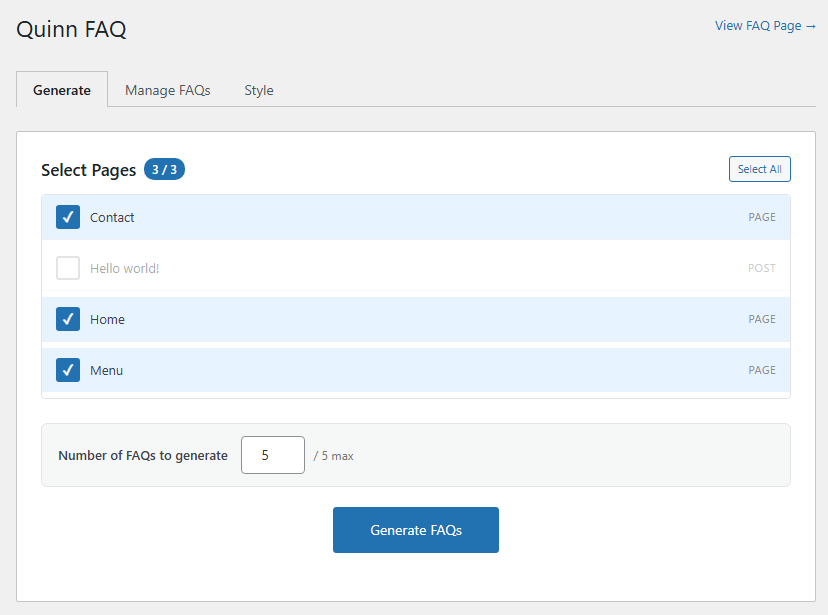
Page selection — choose which pages Quinn should read 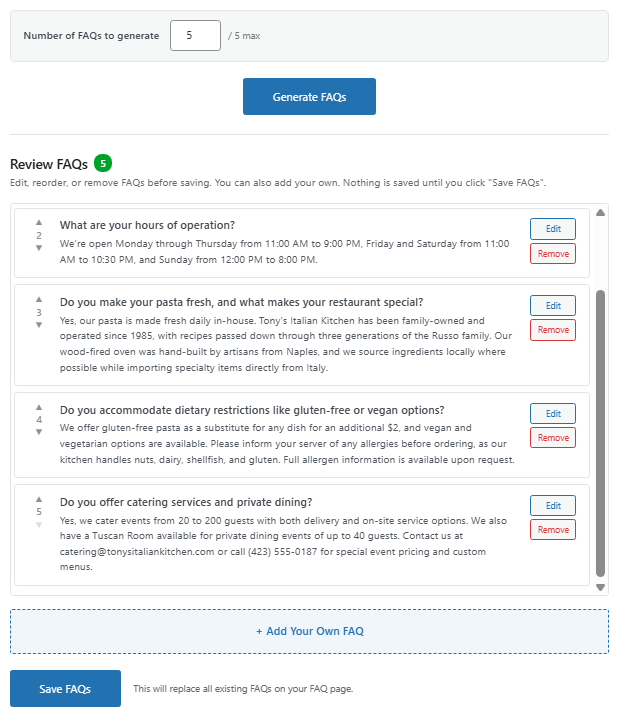
AI-generated FAQs ready for review 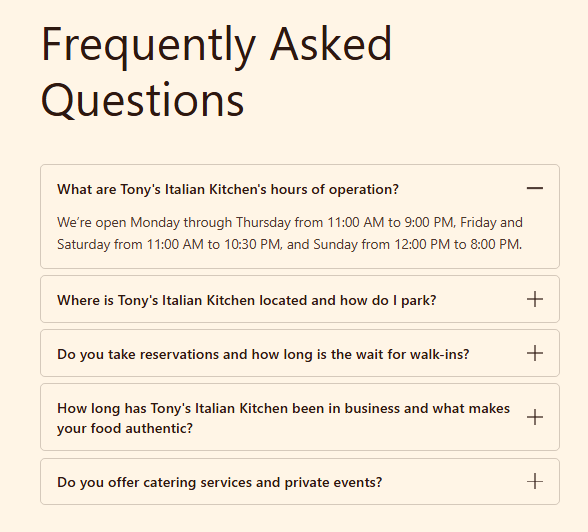
Frontend accordion display on your FAQ page
Blocos
Este plugin inclui 1 bloco.
- Quinn FAQ Display AI-generated FAQ accordion for this page.
Instalação
- Upload the
quinn-faqfolder to/wp-content/plugins/ - Activate the plugin through the ‘Plugins’ menu in WordPress
- Go to Quinn FAQ in the admin sidebar
- Select your pages in the Generate tab and click Generate FAQs
- Review your FAQs, make any edits, and click Save
That’s it. Your FAQ page is live.
Perguntas frequentes
-
Do I need an API key?
-
No. Unlike other AI plugins, Quinn handles everything for you. There’s nothing to configure — just install and generate.
-
How much does it cost?
-
Quinn is completely free.
-
How do I display FAQs on my site?
-
Quinn automatically creates a
/faqpage when you activate the plugin. You can also use the[quinn_faq]shortcode or the Quinn FAQ Gutenberg block to display FAQs anywhere. -
Does Quinn add FAQ schema markup?
-
Yes. Quinn automatically injects Schema.org FAQPage JSON-LD structured data into every page with FAQs. This makes your content eligible for Google’s rich snippet display.
-
Can I edit the FAQs after they’re generated?
-
Absolutely. Quinn gives you a full review workflow — edit questions, rewrite answers, reorder, or remove any FAQ before saving. After saving, you can continue to manage them from the Manage tab. You can also add your own custom FAQs anytime.
-
What AI model does Quinn use?
-
Quinn is powered by Anthropic Claude (Haiku 4.5 by default for fast, cost-efficient generation). You can switch to Claude Sonnet 4 for even higher quality output.
-
Can I change how many FAQs are generated?
-
Yes. You can adjust the FAQ count from 1 to 5 per generation.
-
What does the accordion look like?
-
Quinn uses a clean, accessible accordion with a Classic style — minimal borders and smooth transitions. It automatically adapts to your theme’s colors using CSS custom properties.
-
Where can I get support?
-
Join the Quinn community on Discord: https://discord.gg/m4GN6PXQGF
Avaliações
Este plugin não tem avaliações.
Contribuidores e programadores
“Quinn FAQ” é software de código aberto. As seguintes pessoas contribuíram para este plugin:
Contribuidores
Traduza o “Quinn FAQ” para o seu idioma.
Interessado no desenvolvimento?
Consulte o código, consulte o repositório SVN, ou subscreva o registo de alterações por RSS.
Registo de alterações
1.2.0
- New: Clean accordion styling with theme-aware design
- New: Configurable FAQ generation count
- New: Add your own custom FAQs alongside AI-generated ones
- New: Bulk delete — select and remove multiple FAQs at once
- New: Discord community support link in admin
- Improved: Theme compatibility — accordion styles adapt to any theme’s colors
- Improved: Card style uses pseudo-element accent bars for reliable rendering
- Improved: Focus outline only shows on keyboard navigation, not on click
- Fixed: Icon alignment in Card accordion style
- Fixed: Sleek chevron icon animation
1.1.0
- New: Multi-page selection — Quinn reads across your entire site
- New: Review workflow — edit, reorder, remove FAQs before saving
- New: Dedicated /faq page created automatically on activation
- New: Improved FAQ save workflow
- New: Proxy architecture — no API key required
- New: Theme-aware accordion styling using CSS custom properties
- Improved: Holistic FAQ generation across multiple pages
- Improved: Friendly error messages (no technical details exposed)
1.0.0
- Initial release