

Descrição
Shop Manager for WooCommerce gives store owners and managers a clean, fast frontend dashboard to run their entire WooCommerce store — without needing access to the WordPress admin.
Whether you’re handling 10 orders a day or 500, the goal was simple: make WooCommerce management feel less like work. Every screen is built around what you actually need to do — create orders, update statuses, manage products, track customers — not what the database looks like on the inside.
✨ All Features | 💰 Upgrade to Pro | 📖 Documentation | 🆘 Support
Most WooCommerce store managers spend half their day inside the WordPress backend — an interface that was never really designed for high-volume order management. Shop Manager replaces that with a purpose-built frontend dashboard that’s fast, intuitive, and actually pleasant to use.
You get full order management, product management, a real-time analytics dashboard, and a customer CRM — all in one place. The Pro version also includes AI-powered tools that can write your product content, auto-tag your customers, and surface insights about your store.
🚀 Key Features
- 📋 Frontend WooCommerce dashboard — manage your entire store without logging into the WordPress admin
- 🛒 Full order management — create, edit, delete, bulk-update, and export orders as CSV
- 📦 Complete product management — add/edit products with variations, categories, brands, tags, attributes, and reviews
- 📊 Real-time analytics — revenue, average order value, top products, and order trends — live, no 12-hour cache delay
- 👥 Customer list & profiles — full purchase history, billing & shipping addresses, notes, order stats, and tags
- 🏷️ Custom order statuses — create unlimited custom statuses with color presets that fit your exact workflow
- 🤖 AI product content generator — write product titles, short descriptions, and full descriptions with one click
- 🧠 AI customer auto-tagging — automatically segments customers as VIP, Loyal, At Risk, Big Spender, Frequent, New, or Inactive
- 💡 AI dashboard insight cards — plain-English summaries of what’s happening in your store right now
- 🔑 Your own AI keys — works with Anthropic Claude, OpenAI, or Google Gemini; keys are AES-256 encrypted
- 📤 CSV export — export product lists and order data for reporting, accounting, or migration
- ⚡ Built for WooCommerce HPOS — fully compatible with High-Performance Order Storage
✅ Free Version Features
The free version covers the essentials — enough to manage a real store day to day:
- ✅ Frontend Dashboard — view your store at a glance without touching the WP admin
- ✅ Order list — search, filter, and view order details
- ✅ Bulk order actions + CSV export
- ✅ Create, edit, and delete products
- ✅ Product variations, categories, brands, tags, attributes, and reviews
- ✅ Real-time analytics — revenue, AOV, top products
- ✅ Customer list with purchase history
- ✅ Fully responsive — works on desktop, tablet, and mobile
🔥 Pro Version Features
Pro unlocks the full toolkit for growing stores:
- 🤖 AI product content generator — write product titles, short descriptions, and full descriptions with one click
- 🤖 AI customer auto-tagging — automatically segments customers as VIP, Loyal, At Risk, Big Spender, Frequent, New, or Inactive
- 🤖 AI dashboard insight cards — plain-English summaries of what’s happening in your store
- 🔑 Multi-provider AI support — works with Anthropic Claude, OpenAI, and Google Gemini; bring your own API key
- 🔓 Advanced order management — create, edit, and delete orders directly from the frontend
- 🔓 Advanced order filters — filter by status, date, customer, and more
- 🔓 Custom order statuses (unlimited) — with color presets and visual workflow control
- 🔓 Customer notes & communication log — keep track of interactions on every customer profile
- 🔓 Invoice PDF generation — generate and download professional invoices (upcoming)
- 🔓 Profitability dashboard with COGS — see actual profit margins, not just revenue (upcoming)
- 🔓 Customer segmentation + export — filter customers by tag, spend, or behavior and export the list (upcoming)
- 🔓 Advanced coupon management + analytics — create and track coupons from the frontend (upcoming)
- 🔓 Smart inventory alerts — get notified before you run out of stock (upcoming)
- 🔓 Order workflow automation rules — trigger actions automatically based on order conditions (upcoming)
- 🔓 Cart abandonment recovery — identify and follow up on abandoned carts (upcoming)
- 🔓 Returns & refund handling — process returns without going to the backend (upcoming)
- 🔓 Tax management (EU VAT, UK, US) — compliance-ready tax tools (upcoming)
- 🔓 GDPR compliance dashboard — manage data requests and consent records (upcoming)
- 🔓 Employee management + role-based access — control who can see and do what (upcoming)
- 🔓 API & webhook manager — connect your store to other tools (upcoming)
- 🔓 White label option — remove Oxilab branding for client projects (upcoming)
- 🤖 AI inventory reorder predictions (upcoming)
- 🤖 AI automation rule suggestions (upcoming)
- 🤖 AI profit analysis summary (upcoming)
- 🤖 AI dynamic pricing engine (upcoming)
- 🤖 AI personalized cart recovery emails (upcoming)
- 🤖 AI chat assistant (natural language queries) (upcoming)
- 🎧 Priority email support — 24h response on Pro, 12h on Business, live chat on Agency
👉 See full Free vs Pro comparison
🎯 Perfect For
- 🏪 Store owners who don’t want to spend time in the WordPress admin every morning
- 👩💼 Shop managers and employees who need to handle orders without full admin access
- 👨💻 WooCommerce developers and agencies building client dashboards that clients can actually use
- 📦 High-volume stores that need fast bulk actions and reliable status workflows
- 🌍 Multi-language stores — built with WordPress i18n and translation-ready throughout
📈 Why Shop Manager
There are a handful of WooCommerce frontend manager plugins out there, but most of them were built years ago and show it. Shop Manager was designed from scratch — built with React, tested against real store workflows, and updated regularly.
Here is what actually sets it apart:
- 🤖 AI tools built in — not a third-party integration; the product generator and customer tagging are part of the plugin. Bring your own API key for Claude, OpenAI, or Gemini and it just works.
- ⚡ Real-time data — the dashboard pulls live data, not cached summaries from 12 hours ago
- 🏷️ Smart customer tagging — customers are automatically segmented based on actual order behavior, not manual effort. Tags update when orders change.
- 📋 Workflow-first order management — custom statuses, bulk actions, and CSV export are all designed around how fulfillment workflows actually work
- 🔒 Secure by default — API keys are AES-256 encrypted, all REST endpoints are nonce-verified, and user access respects WooCommerce roles
- 🔄 HPOS compatible — fully tested with WooCommerce High-Performance Order Storage, which is default in WooCommerce 8.0+
Ecrãs
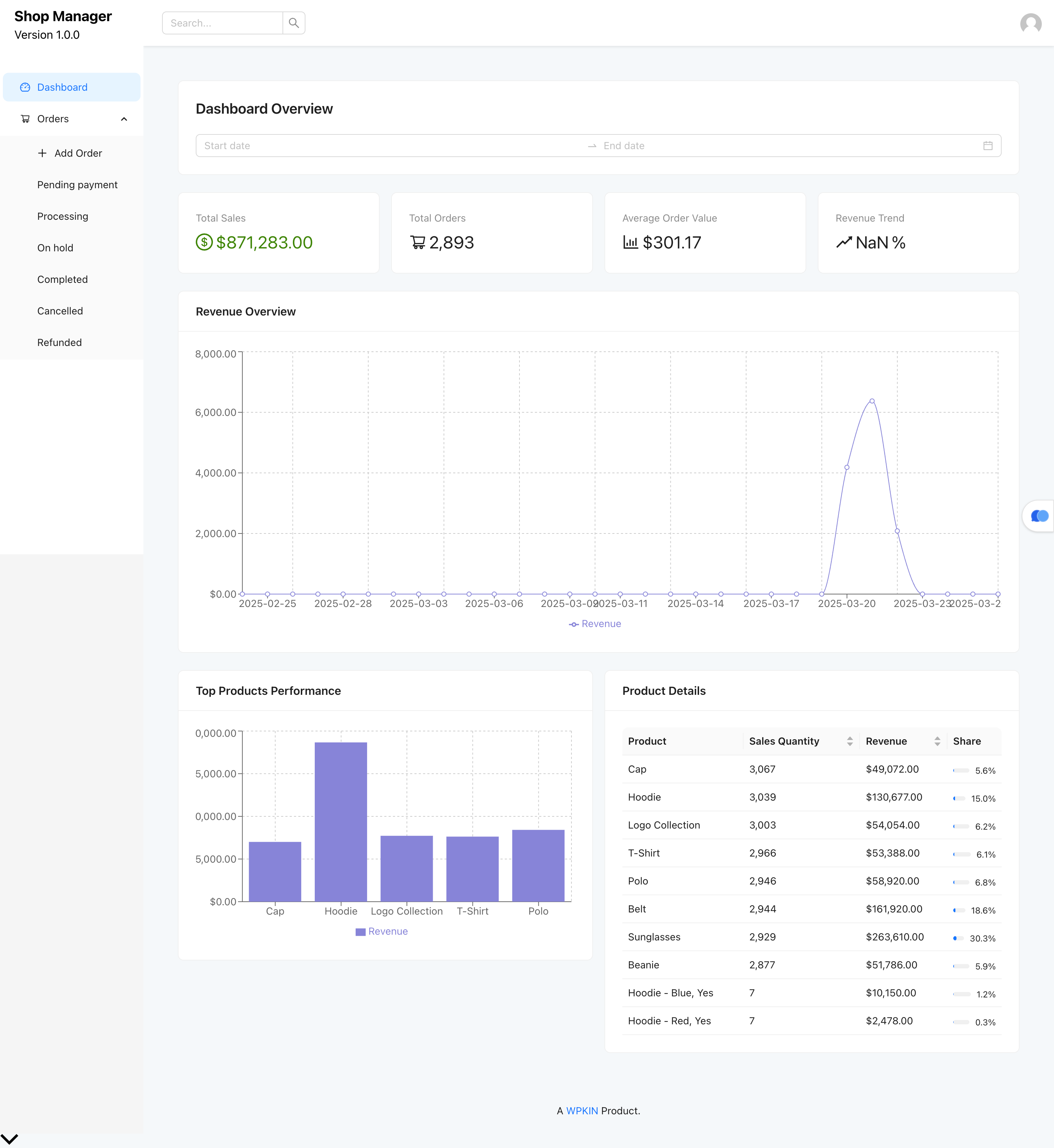
📊 Real-time analytics dashboard — revenue, order trends, and AI insight cards at a glance. 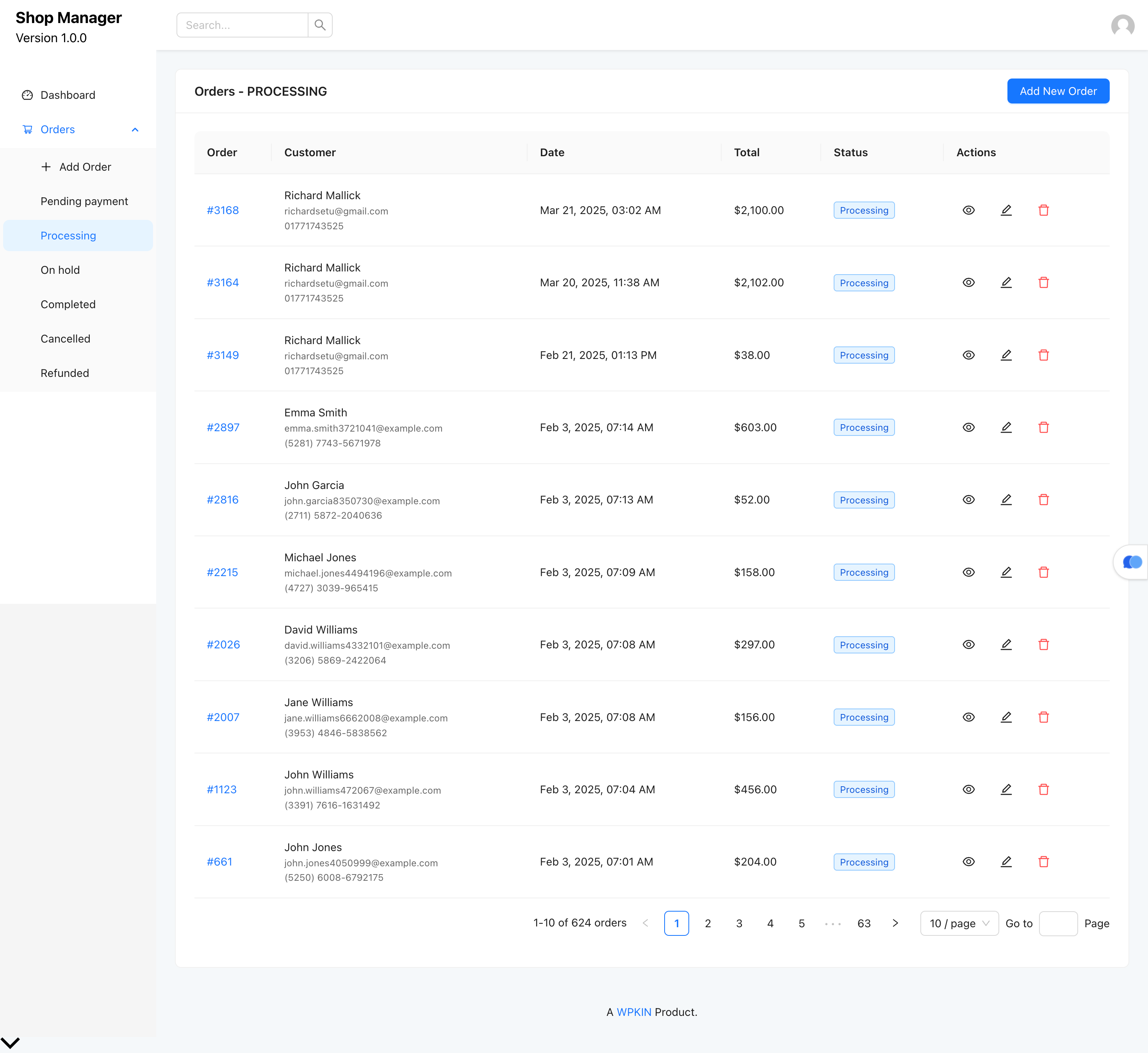
🛒 Order management — full list with search, filters, status column, and bulk action toolbar. 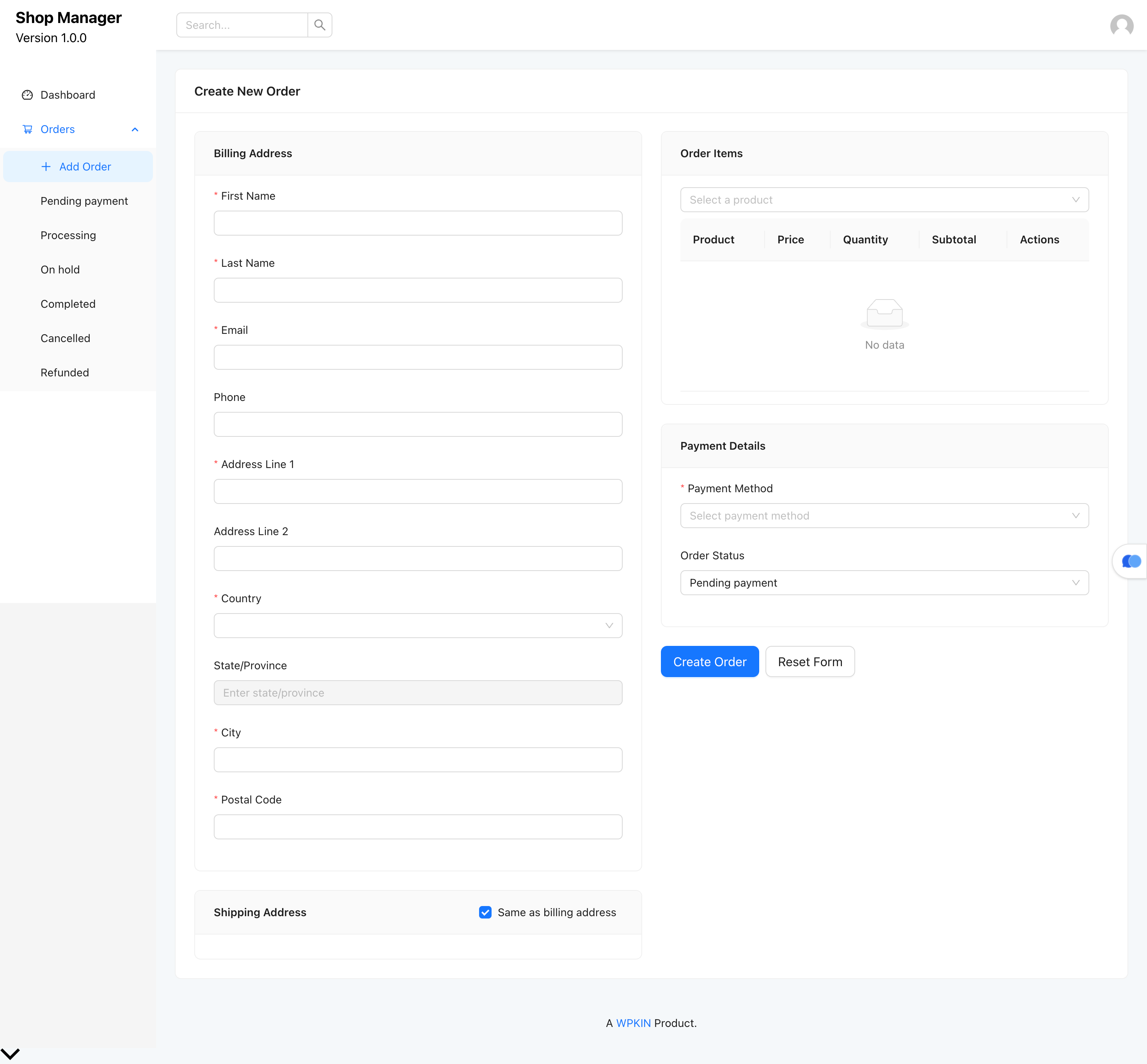
📝 Add / Edit product form with inline AI content generation buttons. 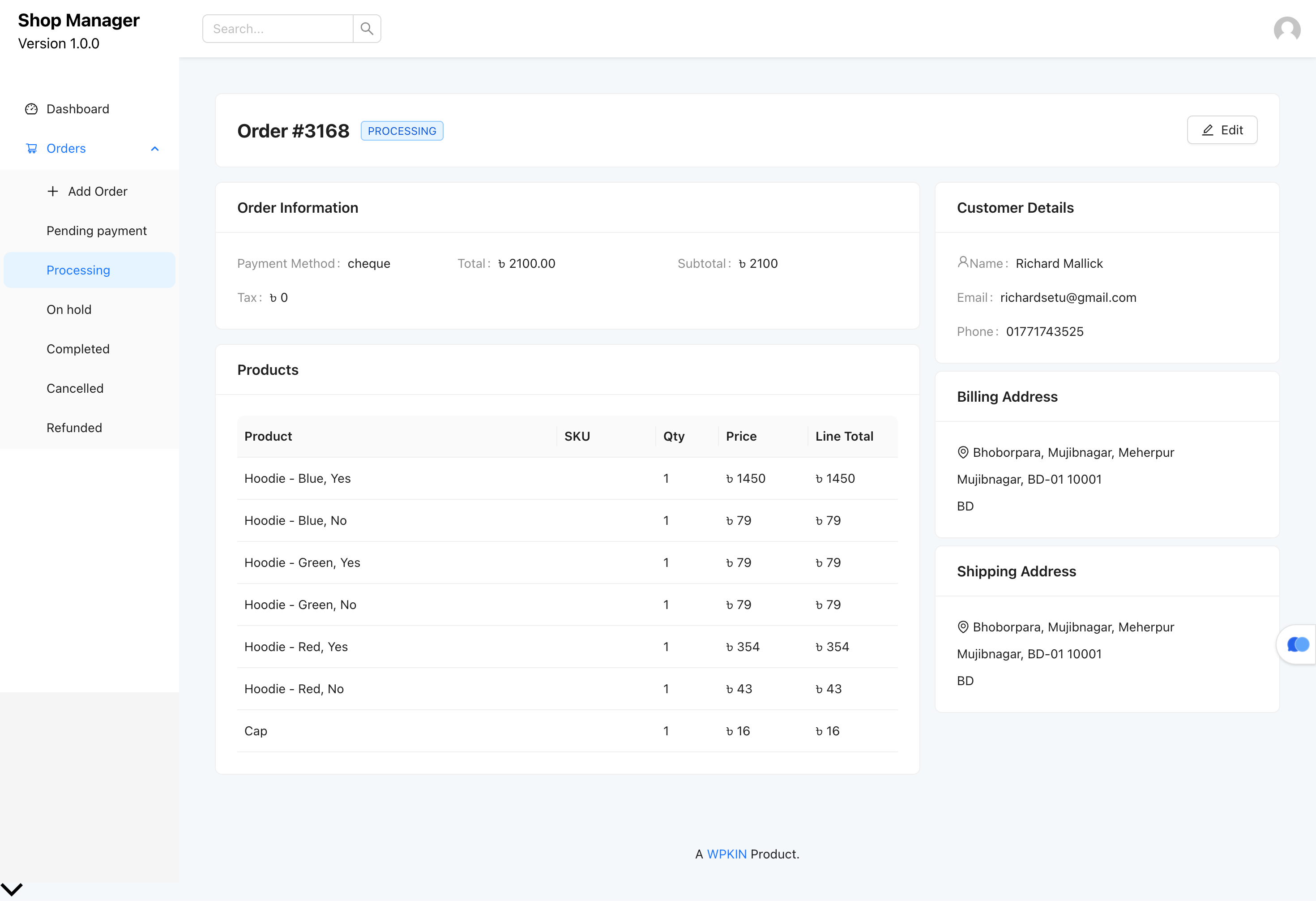
🤖 AI content modal — tone selector, custom instructions, and per-field generation controls. 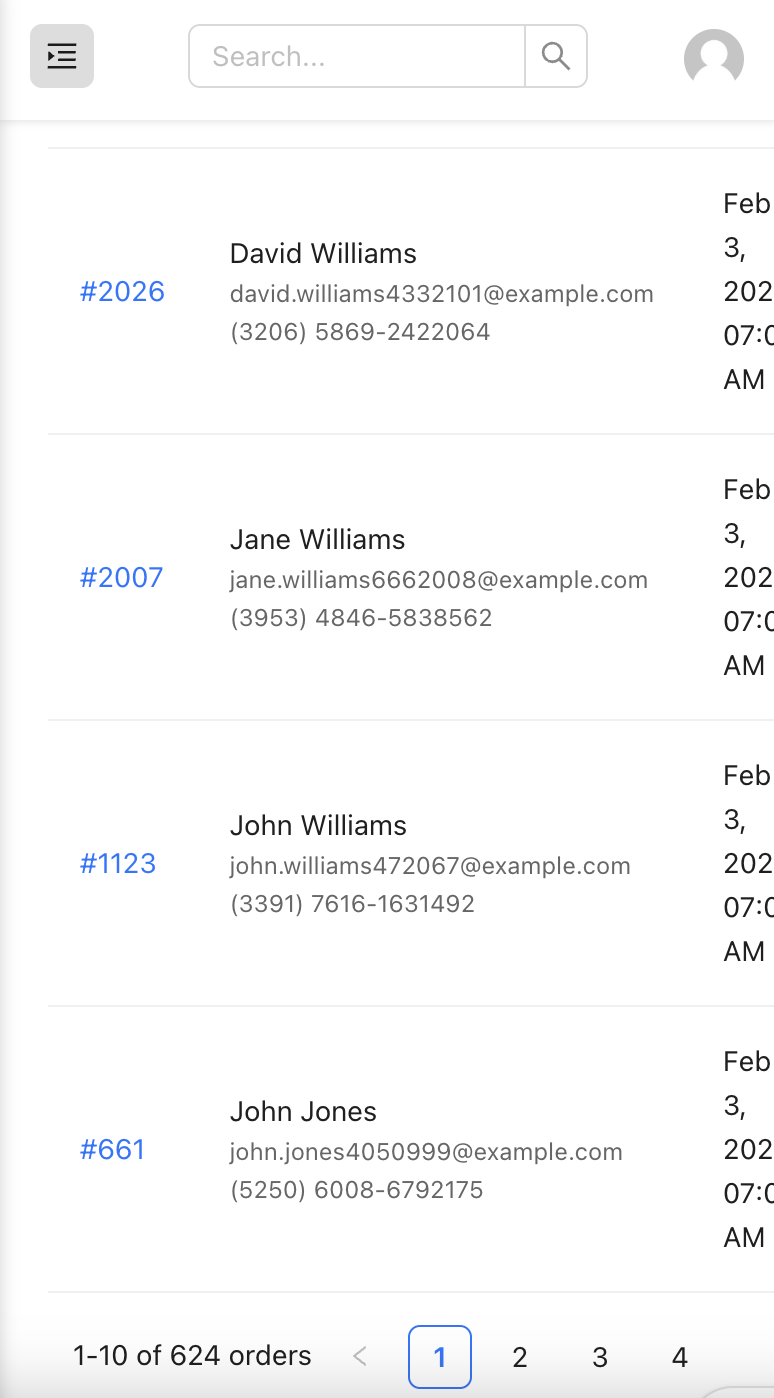
👥 Customer list — search, tag filter, purchase stats, and auto-tag badges.
Instalação
⬇️ Option 1 — Install from WordPress.org (Recommended)
- 🔑 Log into your WordPress admin
- 🔍 Go to Plugins > Add New and search for Shop Manager for WooCommerce
- 🖱️ Click Install Now, then Activate
📦 Option 2 — Manual Upload
- ⬇️ Download the plugin zip from WordPress.org
- 📂 Go to Plugins > Add New > Upload Plugin
- 📤 Upload the zip file and click Install Now
- ✅ Click Activate Plugin
🚀 Getting Started
- After activation, go to Shop Manager in your WordPress admin sidebar
- The frontend dashboard shortcode
[shop_manager]is available for embedding in any page - To use AI features, go to Shop Manager > Admin > AI Settings and enter your API key
- Visit the Customer Settings tab to configure auto-tagging thresholds for your store
Perguntas frequentes
-
🔌 Does this plugin require WooCommerce?
-
Yes. Shop Manager is built entirely on top of WooCommerce and requires it to be installed and active. It is not compatible with other eCommerce plugins.
-
🤖 Do the AI features cost extra?
-
No. AI features are included in all plans, including the free version. You bring your own API key from Anthropic (Claude), OpenAI (GPT), or Google (Gemini). Your actual usage cost depends on your store’s volume and the provider you choose — typically $1–5 per month for average stores.
-
🔒 Is my API key stored securely?
-
Yes. API keys are encrypted with AES-256-CBC using your WordPress secret keys before being saved to the database. The raw key is never exposed in the browser, API responses, or log files.
-
⚡ Does it work with WooCommerce HPOS?
-
Yes. Shop Manager is fully compatible with WooCommerce High-Performance Order Storage (HPOS), which became the default in WooCommerce 8.0.
-
🏷️ How does the AI customer auto-tagging work?
-
When an order is placed or its status changes, Shop Manager automatically recalculates tags for the customer based on their order history. Tags like VIP, Loyal, At Risk, and Big Spender are defined by thresholds you set in the admin settings — and you can adjust those thresholds at any time. Changing thresholds triggers a recalculation for all customers automatically.
-
🛒 Can I create and edit orders from the frontend?
-
The free version lets you view orders, run bulk actions, and export to CSV. Creating and editing orders from the frontend is a Pro feature.
-
👥 Can shop employees use this without admin access?
-
Yes. You can control who can access the frontend dashboard through WordPress role settings. The plugin respects the excluded roles configuration in the admin settings.
-
📱 Does it work on mobile?
-
The frontend dashboard is responsive and usable on mobile, though it is designed primarily for desktop use by store managers. All core workflows — order management, product editing, customer review — work on tablet and mobile.
-
🔄 What happens to existing data when I activate the plugin?
-
Nothing changes. Shop Manager reads your existing WooCommerce orders, products, and customers — it doesn’t create or migrate any data on activation.
-
🆓 Is there really a free version?
-
Yes. The free version includes the frontend dashboard, order viewing, bulk actions, product management, customer list, real-time analytics, and the AI tools (product generator, customer auto-tagging, insight cards). Pro unlocks advanced order creation, custom statuses, and the upcoming automation and compliance features.
Avaliações
Este plugin não tem avaliações.
Contribuidores e programadores
“Shop Manager for WooCommerce – Frontend Dashboard, Orders & AI Tools” é software de código aberto. As seguintes pessoas contribuíram para este plugin:
Contribuidores

Traduza o “Shop Manager for WooCommerce – Frontend Dashboard, Orders & AI Tools” para o seu idioma.
Interessado no desenvolvimento?
Consulte o código, consulte o repositório SVN, ou subscreva o registo de alterações por RSS.
Registo de alterações
1.2.0
- 🆕 New: AI Settings page — configure provider (Claude, OpenAI, Gemini), model, temperature, and max tokens from the admin dashboard
- 🆕 New: AI product content generator — one-click generation of product title, short description, and full description inside the Add/Edit Product form
- 🆕 New: Per-field AI buttons — generate only the field you need without running a full generation
- 🆕 New: Custom Instructions field in AI modal — guide the AI with your own prompt for full creative control
- 🆕 New: Tone selector — Professional, Casual & Friendly, Premium/Luxury, Playful & Fun, Minimalist
- 🆕 New: Multi-provider AI support — Anthropic Claude, OpenAI GPT, and Google Gemini
- 🔒 New: API keys encrypted with AES-256-CBC using WordPress secret keys; never exposed to the browser
- 🆕 New: Test Connection button in AI Settings to verify API key before saving
- 🆕 New: Customers page — full customer list with search, country filter, tag filter, order count, total spent, and last order date
- 🆕 New: Customer Profile page — billing & shipping address, order stats, order history, notes, and tag management
- 🆕 New: AI customer auto-tagging — automatically tags customers as vip, loyal, new, at_risk, big_spender, frequent, or inactive based on order behaviour
- 🆕 New: Auto-tags are event-driven — recalculated on order status change or new order; time-based tags use a 24h transient cache
- 🆕 New: Manual tags — add/remove custom tags on the Customer Profile; manual tags are never overwritten by the system
- 🆕 New: Guest order matching — customer metrics and tags include guest orders placed with the same billing email
- 🆕 New: Bulk tag refresh — recalculate tags for all customers at once from the customer list
- 🆕 New: Customer Settings admin tab — configure all auto-tagging thresholds and excluded roles; changing thresholds invalidates all cached tags automatically
- 🆕 New: Color presets added to order status edit/add modal — 15 built-in color combinations with visual swatch selector
- 🆕 New: Attributes page — create, edit, and delete WooCommerce product attributes and terms from the frontend
- 🆕 New: Subcategory hierarchy — categories and brands display with WooCommerce-style dash indentation in lists and dropdowns
- 🆕 New: CSV product export — download selected or all products as a CSV file directly from the product list
- 🆕 New: “View Product” button on Edit Product page — opens the product’s frontend page in a new tab
- ✨ Improvement: Rebranded from WPKIN to Oxilab across all display text and frontend footer
- ✨ Improvement: Admin settings tab position now persists on page reload via URL hash
- 🐛 Fix: Attribute terms failing to load due to invalid orderby parameter
- 🐛 Fix: Sale price validation used string comparison, causing single-digit prices to incorrectly trigger a “greater than regular price” error
- 🐛 Fix: Brands, Attributes, and Reviews sidebar menu items now correctly stay active when those pages are visited
- 🐛 Fix: “View” action in product list now opens the product’s frontend page instead of the WP admin edit screen
- 🐛 Fix: Hook names prefixed with wpkin_sm_ to avoid collisions with other plugins
1.0.5
- 🆕 New: Add Product and Edit Product pages
- 🆕 New: All Products list page
- 🆕 New: Categories, Tags, Brands, and Reviews pages
1.0.4
- 🐛 Fix: Data saving issue resolved
1.0.3
- 🆕 New: Translation support — full WordPress i18n throughout the plugin
- ✨ Improvement: Overhauled order management workflow
1.0.0
- 🎉 Initial release — frontend order dashboard with create, edit, delete, and status management